The 10 Best Business Process Workflow Tools for Loan Officers
Business process workflow tools allow small firms to map out, track, and correct tasks in everyday work. They allow owners to identify bottlenecks, reduce inefficiencies, and maintain momentum.
Many of them integrate with or are part of CRM or digital marketing tools, so it is simple to use that data for smarter campaigns. When you have the right tool, teams operate with less stress and more organization.
Next, learn how to select tools that complement your objectives and conserve time.
Key Takeaways
Business process workflow tools drive consistency and increase visibility. They help teams meet compliance standards and smooth out operations for organizations big and small.
Automating approvals and routine tasks accelerates decision-making, lessens bottlenecks, and boosts general productivity, especially in processes such as loan management.
With advanced workflow visibility and real-time analytics, managers can proactively identify problems and optimize resource allocation. This delivers tangible efficiency improvements.
Less manual input and enforced templates reduce errors, and built-in compliance checks make staying within regulations and auditing a breeze.
With seamless integration to other business systems, customizable features like automated triggers and reporting dashboards enable you to scale and adapt workflows as your needs evolve.
By investing in team training, process documentation, and continuous improvement, you can ensure your workflow systems remain effective, relevant, and aligned with changing business goals.
Table of Contents
Core benefits of business process workflow tools
Key features in a loan pipeline CRM
Beyond automation: empowering your team
Implementing your new workflow
Future of workflow and business process management systems
What are business process workflow tools?
How do workflow systems support team collaboration?
What features should a loan pipeline CRM include?
How do workflow tools go beyond automation?
What steps are needed to implement a new workflow system?
Core benefits of business process workflow tools
Business process workflow tools, particularly modern bpm tools, are a must-have for small businesses and solopreneurs aiming to organize daily operations, reduce expenses, and enhance customer service. By mechanizing and systematizing workflows, these bpm systems boost productivity and help teams focus on what matters most: growing the business and achieving goals faster.
Increase efficiency through automated repetitive processes that liberate your employees for creative or high-complexity work.
Increase productivity as your employees spend less time on manual tasks and more time on high-value work.
Save significant manual work hours and reduce unnecessary costs.
Make more informed decisions with up-to-the-minute, reliable data on how workflows perform.
Make your employees happier by eliminating busywork and letting them engage with projects.
Simplify operations, reduce waste, and assist in reaching business objectives more efficiently.
Improve customer experiences through faster, more consistent service delivery.
Boost quality control and business performance with improved tracking and documentation.
1. Accelerated approvals
Automated approval workflows eliminate bottlenecks and accelerate decision-making, especially critical in time-sensitive processes such as loan approvals. When approvals are fast, customer satisfaction is high due to reduced response times. Automated reminders prevent anything from falling between the cracks and transparent approval stages provide visibility into the status of every request.
This framework assists managers in monitoring the loan pipeline and identifying bottlenecks before they become critical.
2. Enhanced visibility
Workflow tools provide real-time visibility to process progress, enabling teams and managers to intervene before issues become critical. Dashboards display key statistics and make it simple to monitor the performance of various processes. Sharing workflow statuses keeps everyone on the same page, resulting in fewer missed handoffs and less confusion.
Analytics emphasize which steps drag things down, assisting teams in targeting their efforts to make workflows smoother.
3. Reduced errors
Automating data entry reduces the possibility of errors at crucial moments. Validation rules built into workflows catch errors early, so problems do not snowball. Templates make sure your documents look and read the same way every time, which projects a professional image and consistency.
By tracking error rates over time, teams can identify trends and adjust processes to maintain accuracy.
4. Improved compliance
With compliance checks embedded into your daily workflows, you can stay on top of regulatory requirements with no additional manual work. Every step is logged, so audits are easier and less anxiety inducing. Automating compliance reports minimizes the opportunity for human error and frees up staff time.
As regulations shift, updating workflows keeps you compliant and stress free.
How workflow systems operate

Workflow systems empower small businesses and teams to achieve more by connecting people, tools, and tasks in a defined sequence. They provide one place to organize, execute, and modify tasks, so your whole team understands what to do, when, and how. In these systems at the core, work items flow from initiation to completion according to business rules, not luck or guesswork.
This eliminates much of the grunt work and email ping-pong that bog things down, particularly when you’re working on mundane day-to-day tasks or client requests. A big part of how these systems work is by pulling different business apps together into one flow. For instance, a CRM can communicate with email, billing, and cloud storage, creating a seamless workflow management experience.
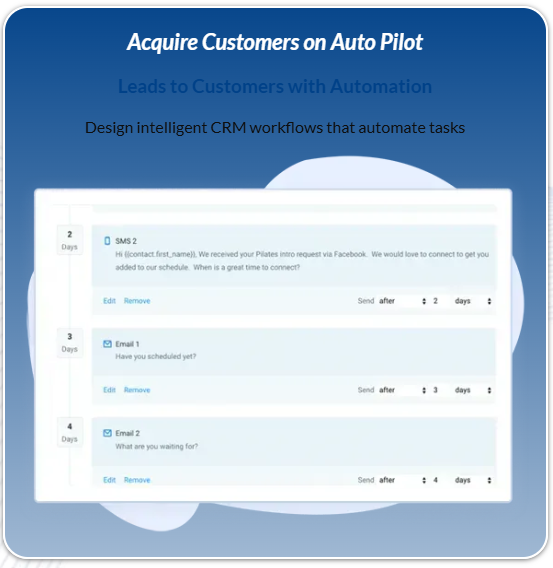
When a fresh lead flows in, the workflow could generate a contact record, deliver a welcome email, and initiate a follow-up task, all without anyone inputting information twice or worrying about skipping a step. That’s less typing, fewer mistakes, and more speed. Most workflow systems use "if/then" logic. If this happens, then that new step kicks in, enhancing the overall process automation capabilities.
For instance, if a payment is late, then remind or alert the billing team. The basic units of any workflow are inputs (data or files flowing in), the transformation (what happens to those inputs—review, approval or change), and the outputs (final result—e.g., email or order shipped).
Workflows can be straightforward, triggering an alert when a form is filled, or intricate, involving multi-step approvals across teams. These can be process workflows (everyday work), case workflows (special situations such as customer support), or project workflows (one-off projects with many stages), showcasing the versatility of modern BPM tools.
Visual workflow builders make it easy to design and fine-tune these steps. Drag-and-drop tools allow you to diagram each step, establish rules, and visualize how work passes from individual to individual. This provides all of you with a transparent overview of the status, ownership, and bottlenecks, streamlining your business processes.
This means you can modify the process in minutes when things need to move around, without summoning IT assistance. Automation handles the majority of the hard labor. The system monitors for triggers such as a new lead, signed contract, or missed deadline and executes the subsequent steps, notifying the appropriate individuals.
This liberates team time, maintains momentum, and reduces bottlenecks. It implies that teams can measure momentum, identify bottlenecks, and uncover holes before they lead to issues. Analytics baked into workflow systems provide real-time insights into operations.
It shows you which stages are most time-consuming, where mistakes occur, and the overall speed of flow. This information aids in identifying where to repair, experiment with alterations, and continue optimizing the process. The system logs activity and who acted when, simplifying compliance and facilitating auditing.
Key features in a loan pipeline CRM
A loan pipeline CRM is a business process workflow tool that’s specially designed for loan origination, processing, and client engagement. It’s a blend of automation, reporting, and integration that small lenders, brokers, and mortgage professionals use to streamline workflow and enhance client experience.
The table below summarizes core features, their functionalities, and benefits:
Custom fields

Custom fields allow lenders to record unique data points, such as the property type, loan program, or borrower employment status, that are relevant to their particular lending process. Rather than using generic templates, teams can define fields that meet their business or regulatory requirements.
This flexibility lets mortgage professionals and brokers create a CRM that reflects how they really work, not what the software vendor thought they did. With well-designed custom fields, you enhance data quality from the get-go. Clients complete forms with all the key information, minimizing the back-and-forth for missing details.
These fields enable fine-grained reporting, allowing you to run analytics or follow trends in line with your business objectives. For instance, a lender serving first-time buyers can add fields to monitor government program eligibility or self-employed income types.
Automated triggers
Automated triggers and manual work accelerate client response and keep the loan process flowing. They ensure no steps are skipped and that every deal advances on schedule.
For example:
Email me a follow-up when a new application comes in.
Assign deals to senior loan officer if the amount is greater than $500,000.
Remind clients automatically to upload required documents.
Notify underwriters when a loan passes initial review.
Trigger task creation when an appraisal is scheduled.
By eliminating friction, loan officers can spend more time servicing customers and closing deals instead of chasing paperwork or reminders.
Integration APIs
APIs allow your CRM to communicate with other platforms, such as ARIVE, credit check services, or LOS. That translates to no more copy-pasting between apps, fewer mistakes, and an easier time keeping all of your data synchronized across platforms.
Sharing real-time updates with your entire team or your clients becomes much simpler. It lets you scale your workflow as you grow and add new tools as your business evolves, without reinventing the wheel.
Reporting dashboards
Dashboards in a loan pipeline CRM provide clear, real-time information about your pipeline, allowing you to identify bottlenecks or top performers at a glance. Customizable reports let you explore deal stages, document status, or lead source.
For instance, key performance indicators (KPIs) include:
Beyond automation: empowering your team

Business process workflow tools have transformed how teams work, especially with the emergence of modern bpm tools. The real worth extends far beyond simply saving time through process automation. Thanks to the rise of intuitive low-code and no-code platforms, more people within an organization can influence how work gets done.
This turns control over to the business users, or “citizen developers,” who understand those daily irritations all too well. Instead of relying on IT to take months building or repairing a process, anyone with appropriate permissions can map a workflow, configure simple rules, and deploy automations. This enables small businesses and growing teams to work more quickly and with less obstacle.
For instance, a marketing manager can create a lead capture and follow-up workflow using business process management software with no coding required, or a sales team could create an approval process for discounts directly from their CRM software.
Promoting team collaboration implies utilizing workflow management solutions that render communication and work sharing easy. Good workflow tools have chat, notifications, and task assignments built in so everyone remains on the same page. For a worldwide team, this implies much less uncertainty concerning who is performing what and significantly fewer overlooked actions.
Tools like Slack, Microsoft Teams, or Asana integrate seamlessly with many workflow management systems, enabling teams to exchange files or post updates in a centralized hub. The concept is to eliminate silos and enable collaboration, regardless of where individuals are physically located.
When you define clear roles and steps in a workflow, you foster accountability. When everyone understands their role and observes how work flows from individual to individual, it becomes simpler to identify bottlenecks or holdups. A smartly constructed bpm system indicates step ownership, due dates, and next actions.
This visibility allows managers to monitor progress in real time and address issues rapidly. Over time, this type of structure helps teams trust the process and each other.
Training is key. Even the greatest tools are lacking if people don’t know how to use them. Small businesses really thrive on consistent, active training and simple guides embedded right inside the software. This reduces the learning curve and brings everyone up to speed, even if they’re not techies.
It aids teams in identifying security vulnerabilities, which is vital when processing sensitive information. Workflow tools often have built-in security features like encryption and compliance with rules like GDPR or HIPAA, but they perform only when users know how to use them correctly.
Allowing employees the opportunity to propose modifications is crucial. The people who use a flow every day are the ones who know where it can be improved. Most workflow tools have feedback buttons or easy forms for submitting suggestions.
This establishes a feedback loop where the tool evolves to fit true needs, not just what managers assume are needed. As automation becomes more prevalent, analysts predict that by 2026, thirty percent of companies will automate over fifty percent of their tasks. Grounding these tools in people will keep teams adaptive and motivated.
💡Consider a platform with free custom onboarding services. This saves and provide the setup and training to get started sooner
Implementing your new workflow

Rolling out a new business process workflow tool is more than flipping a software switch. It’s about establishing a simple, actionable plan such that everyone understands what to work on and when. Workflow templates for common needs such as employee onboarding or client info capture can make things easier from day one.
Most teams find more success by beginning with a single workflow that is both frequent and simple to repair. Approvals or requests are good examples, and then leveraging those victories to scale up. The list below gives a simple overview of the main steps:
Define the process, map each step, and assign responsibilities.
Codify steps using detailed instructions and checklists.
Monitor results using performance data and feedback.
Adjust workflows as needed for greater efficiency.
Define processes
Start by charting each step in the workflow, say loan processing, from client request to approval. This aids in identifying missing or redundant steps that impede speed. Always find a way to sneak in, so hunt for anything that’s done daily but is valueless.
Key stakeholders, such as team leads, compliance staff, or IT, should be designated with specific duties. Delegating each piece of the workflow to an individual or team reduces ambiguity and improves handoffs.
Writing down your new workflow leaves a reference for all, particularly new additions. This keeps training straightforward and helps squads adhere to the correct actions. Process mapping tools, such as Visio, Lucidchart or Miro, can assist in illustrating workflows and identifying issues or redundancies.
Codify steps
Write out directions for each to ensure everything gets captured. This is particularly useful as teams scale or roles evolve. Standardizing procedures establishes consistency, so work gets completed the same way each time, whether it’s data entry, approvals, or compliance checks.
Checklists are great for complicated tasks, steering team members and reducing mistakes. For example, a client onboarding checklist can include document collection, reviews, and follow-ups.
Low-code platforms allow subject matter experts to rapidly configure and modify workflows without significant coding knowledge, making updates quick and straightforward. Codified steps must be reviewed frequently.
Update them as you discover what works and what does not, so the workflow always captures best practices.
Monitor results
Measure KPIs, like cycle times or error rates, to determine whether the new workflow performs. Reducing cycle times or increasing compliance are positive signals. Analytics tools baked into many workflow systems assist in collecting and presenting this information so you can identify patterns.
Solicit team input to identify pain points. Their insights frequently expose issues that metrics on their own overlook.
Review workflow performance frequently to ensure it aligns with business objectives. Introduce your enhancements to one team and then roll out company-wide. This allows you to experiment and iterate as you go.
Future of workflow and business process management systems
Workflow and business process management systems are on the cusp of major transformations due to emerging technologies and evolving business requirements. For small business owners and solopreneurs, they unlock opportunities for greater control, agility, and simplicity in everyday work.
Emergence of AI to automate tasks and maximize results.
Stronger push for user-friendly tools to let non-technical users build their own workflows.
More data-driven insights lead to fast, smart decisions.
Blending of workflow, automation, and teamwork in one system.
Increasing demand for organized, recurring workflows and seamless data input.
Center on real-time reactions to changes in the market or your customers.
SYSTEMS THAT PLAY WELL WITH OTHERS—OR YOUR BUSINESS APPS.
AI is the giant accelerator here. It helps people save time by automating tedious work, identifying patterns in information, and offering real-time recommendations. In a few years, AI-powered business process management software won’t just automate steps; it will help identify new business risks, discover opportunities to reduce costs, and recommend new ways to serve customers.
That way, even little crews operate like the big boys, making intelligent decisions and closing issues as soon as they arise. Ease of use is crucial. New BPM tools are leaving behind antiquated, difficult-to-use systems for drag-and-drop makers and clean dashboards.
That frees everyone on your team, regardless of their technical expertise, to create, adjust, or optimize a workflow management solution. Templates, forms, and explicit rules for how work gets done make it easier to stay aligned and avoid errors.
Three types of BPM—integration-centric, human-centric, and document-centric—still matter. For small businesses, selecting the appropriate combination involves understanding which tasks require human involvement, which require data, and which require paperwork monitoring.
AI can assist by highlighting what processes are bottlenecking or which could be better managed by automation. Continuous improvement is now a necessity. The market moves fast, so workflow should, too.
The best BPM tools let you experiment, get feedback, and deploy changes without pausing work. Everything, including data and process records, remains in one secure location, allowing you to easily review, measure success, and strategize next steps.
Conclusion
Business process workflow tools allow teams to work smarter. They remove chaos and guesswork. You know what needs to be done and by whom. No more lost clicks or forgotten action items. Easy tools increase velocity and decrease anxiety. In a loan pipeline CRM, you track leads, reminders, and weak links quickly. Simple configuration means it keeps you productive, not tied up in training. With improved tools, teams address additional work, prevent slips, and support one another every day. Even solo and small shops witness huge increases. If you want to accomplish more with less friction, sample a workflow tool to meet your needs. Need some guidance or assistance to make a start? Contact us and have a free chat with our team.
Frequently Asked Questions
What are business process workflow tools?
Business process management software assists in organizing, automating, and tracking tasks inside a company. These bpm tools make things more efficient, eliminate mistakes, and ensure everything is done right.
How do workflow systems support team collaboration?
Workflow management systems facilitate teams in sharing information, delegating work, and tracking status, ensuring everyone is aligned and informed about critical business processes.
What features should a loan pipeline CRM include?
A loan pipeline CRM should offer workflow management solutions like automation, document handling, and status updates, ensuring safe messaging to effectively manage leads and applications.
How do workflow tools go beyond automation?
Workflow management tools empower your teams by increasing transparency, accountability, and communication, while also serving as a robust bpm platform to monitor progress and address bottlenecks efficiently.
What steps are needed to implement a new workflow system?
First, determine your requirements for a robust bpm platform. Then select the appropriate business process management software, train your team, and establish processes.
Are workflow tools suitable for small businesses?
Indeed, workflow management solutions can be a boon for businesses of all sizes. They assist small teams in remaining organized, minimizing manual workflows, and expanding more effectively.
What is the future of business process management systems?
The future includes more AI, tighter integrations, and more customization, making business process management software smarter and more flexible for managing complex workflows.