
Top 5 small insurance agency CRM software solutions for agents to manage and market effectively
Small insurance agency CRM software provides a multi-channel communication (email, SMS, phone, DMs, ringless voicemails) and online marketing (landing pages, SEO tools, digital content etc.) while mostly emphasize simple dashboards, speedy contact lookup, and easy follow-up reminders.
These platforms like NationwideLeads include templated emails and bulk texting, as well as tracking claims or renewals. Support is everything, so great software provides free onboarding, instant assistance, clear tutorials and even affordable done for you services
This blog illustrates how these small insurance agency CRM tools can accelerate work, reduce expenses, and enable small agencies to grow.
Key Takeaways
CRM software empowers your insurance agency to build stronger client relationships by centralizing data and facilitating personalized communication, turning each interaction into something memorable and impactful.
Automation tools make your day more productive by removing repetitive drudgery and enhancing workflow. This allows agents to concentrate on high-value work and better client engagement.
Advanced analytics and reporting features in CRM systems enable more intelligent lead conversion strategies and track sales performance. This allows agencies to fine-tune their sales funnel for better results.
Automated reminders and centralized databases streamline policy renewals. This results in greater retention and reduced lost renewals. Track your CRM’s ROI by evaluating gains in efficiency, client retention, and revenue. Adapt your approach over time.
Selecting the appropriate CRM should emphasize security to safeguard client information, scalability to accommodate your agency’s growth, and customer support with free onboarding, timely support and DFY services to facilitate seamless adoption.
How CRM software helps insurance agents

CRM software transforms how small insurance agencies engage with clients, handle leads, and compete in a digital marketplace. Built for agencies, these insurance CRM platforms centralize contacts, policies, renewals, and sales, making it simpler for agents to be more productive and provide enhanced service.
1. Client relationships
A CRM captures all client information, from policy information to every email or call. This allows agents to be aware of each customer’s history, coverage, and preferences without having to search through records. It’s a huge assistance when remembering birthdays, renewal dates, or family milestones, that personal touch clients will notice.
Agents can track every touchpoint, whether the client reached out on social, email, or phone. This makes it easy to identify service gaps or follow up faster. With a complete client history, agents respond to inquiries more quickly and with greater assurance.
It even assists in managing feedback immediately, maintaining satisfied and loyal clients.
2. Daily productivity
Routine tasks such as follow-up scheduling, data entry or renewal reminders consume time. CRM automation tools handle these tasks. Agents then talk to more people and do less paperwork.
Task management features aid in sifting through what’s urgent, so things don’t slip by. A CRM keeps team communication in one spot. Agents can email, message, or call from within the system.
It’s simple to monitor performance metrics, follow victories, and identify areas for assistance. Mobile, real-time access allows agents to work while out meeting clients and never miss updates or tasks.
3. Lead conversion
CRM analytics highlight top prospects based on engagement and history. Agents can view which customers opened emails, clicked on quotes, or requested more information. Automated follow-ups from leads who click emails with warm ringless voicemails follow-ups ensuring leads do not go cold.
Each receives the right message at the right time. Sales pipeline tools display each step, so agents are aware of the status of each lead. That helps concentrate attention where it counts.
Custom marketing automations nurture those leads with custom messages, giving you more opportunities to sign new clients.
4. Policy renewals
Automated reminders in a CRM keep renewals on track for agents and clients. It notifies agents when a renewal is approaching so they can immediately refresh policy information. With centralized databases, agents spend less time searching for documents.
Clients receive swift responses regarding their policy standing, and agents detect patterns and strategize more effectively for upcoming renewals. Custom service at renewal time keeps them from shopping around.
5. Agency growth
CRM software identifies new business opportunities by tracking client activity and market data. Agencies can see what is selling and what clients request most, so they can adapt quickly. Automated marketing campaigns reach more prospects, all tracked in one system.
Team members exchange notes and performance insights, so it’s easy to learn and improve collectively. This collaboration assists agencies in growing, reaching more customers, and creating a respected brand.
Key features for your agency CRM
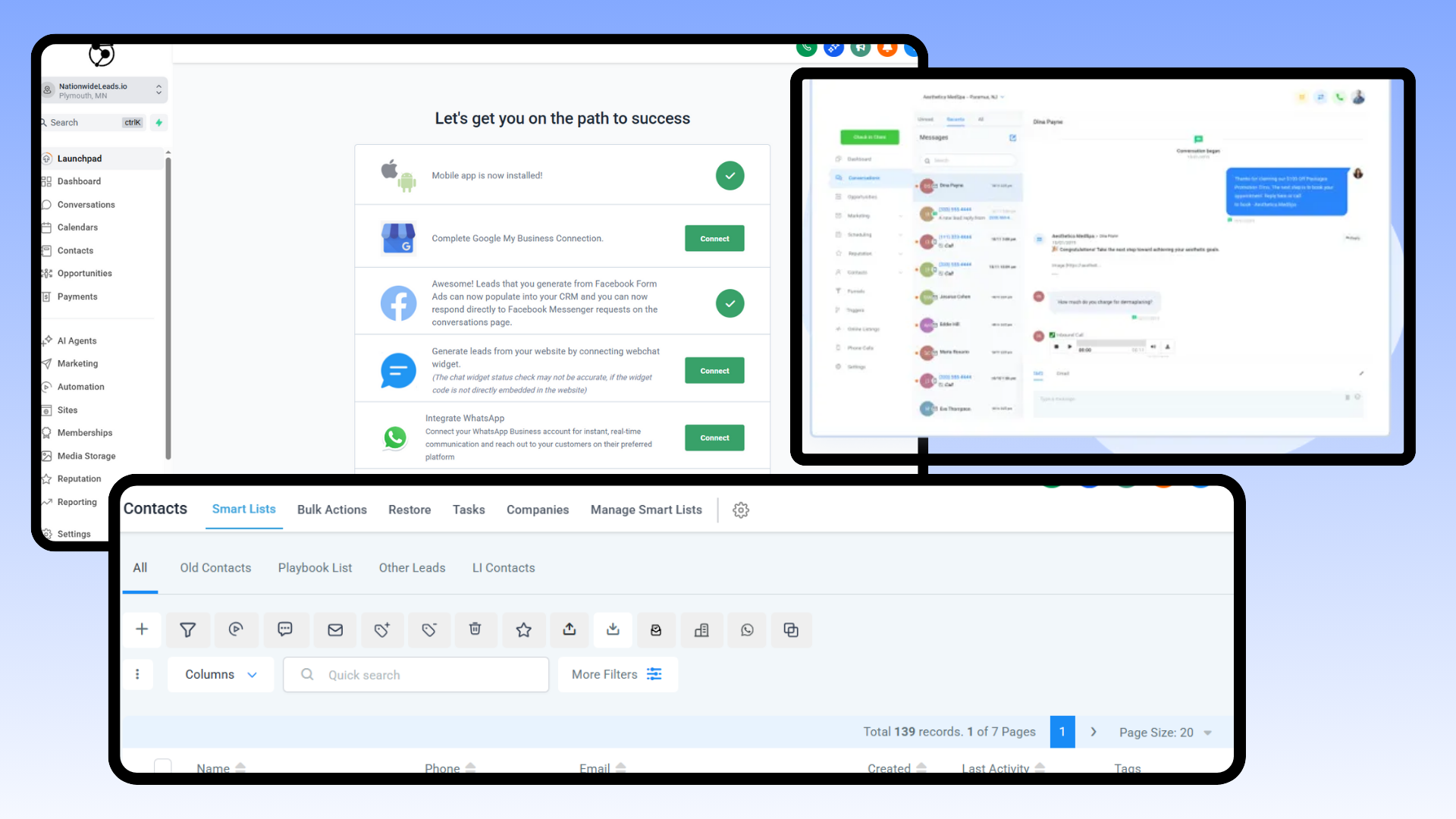
Small insurance agencies need effective insurance CRM software that aligns with their workflows and enhances each client touchpoint, ensuring improved client satisfaction and streamlined insurance workflows.
Automation
CRM tool automation can revolutionize the way small agencies operate on a daily basis. We automate routine activities such as policy renewals, reminders, and lead assignments so your staff can spend time assisting clients.
With workflow automation, teams don’t get bottlenecked. When an agent is out, leads automatically get reassigned. Automated email templates make quick replies a breeze, and marketing automation launches targeted messages to clients, such as renewal reminders or policy notices.
Monitoring automation, in particular, is essential. Leverage built-in dashboards to verify if automated activities run as intended.
Integration
Integration allows a CRM to play nicely with other systems you already use. For a small agency, cloud accounting and document linking tools bring everything into one place.
With API support, your CRM can connect to third-party apps to share client info, eliminating duplicate entry and mistakes. Consider your expansion.
Select a CRM with powerful integrations so that as your agency adopts new tools, your systems remain aligned. A unified platform allows your staff to work from one interface, reducing context switching.
Reporting
Advanced reporting means a lot more than just sales tracking. Key features for your agency include analyzing your agency with CRM reporting and seeing which policies need attention and how clients act over time.
Customizable reports allow your agency to prioritize the most useful statistics, such as conversion rates or client retention. Search for features that emphasize renewal trends or display follow-up response times or agent performance.
Leverage these insights to refine your workflows, allocate resources more effectively, and drive strategic initiatives for your agency. Powerful reporting directs decisions and keeps everyone aligned.
The agency growth engine

A small insurance agency must run lean, act smart, and build trust. Insurance CRM software is today’s growth engine. Unlike manual spreadsheets or generic CRMs, a purpose-built insurance CRM system for insurance provides a genuine advantage. It speaks the insurance teams’ language from day one, with built-in fields for policy numbers, claim status, and customer coverage specifics.
With these capabilities, agents operate more quickly, reduce errors, and ensure every client receives the right assistance at the right moment. Data is the growth fuel. With integrated analytics tools, agencies can identify trends such as emerging demand for a policy type or a client’s risk of churn. For instance, an insurance CRM can segment which products are most popular by region or which clients are most prone to renew.
It allows owners to observe tangible opportunities without speculation. With AI automations, agencies can configure no-code workflows to perform tasks such as sending renewal reminders at 90, 60, and 30 days. That translates to agents spending less time hunting down paperwork and more time engaging with clients, forging relationships, and locking down deals.
A solid insurance CRM like NationwideLeads allows agencies to operate the entire client lifecycle in a single system from initial inquiry to quoting, binding, renewals, and even claims. Visual pipeline management provides real-time clarity on the status of each client. Policy lifecycle tracking ensures nothing falls through the cracks. Agents can view all touchpoints, documents, and discussions associated with each policy.
One place for everything. Data remains fresh with no manual effort, and repeatable actions are automated, so agents always know what’s next. Iterate, iterate, iterate. Today’s insurance CRM platforms make it easy to monitor performance, identify bottlenecks, and experiment with new processes at low risk. Agencies can run small tests, changing onboarding steps, adding a new communication template, and immediately see what works.
This type of agility allows agencies to shift quickly as client priorities or market regulations evolve. Growth strategies operate most effectively when they align with client desires and market demand. Small agencies can leverage CRM insights to cross-sell new products, upsell service, or target new customer segments.
Execution requires work, anywhere between a few weeks to a few months, depending on the agency size and workflows. The payoff is real: better client service, fewer missed steps, and a clear path to growth.
Choosing the right software

Choosing CRM software for a small insurance agency isn’t a feature checklist. The right solution fits your agency’s size, processes, and growth vision, delivering a seamless and secure experience to your team and clients.
Consider these core points when evaluating options:
Security and data privacy include role-based access, encryption, audit trails, and compliance.
Customization, specifically no-code customization for workflows, fields, and reports.
Industry expertise and proven success in the insurance sector.
Scalability for users, data volumes, and new business requirements.
Centralized client experience from first contact through retention.
Support services, training, and onboarding costs.
Budget fit, including software and additional implementation fees.
Assess needs
Map out your workflows, how data passes between team roles and what your clients expect at each touch. This provides a good roadmap for what your software should support.
Include your team in interviews or workshops to identify pain points and gaps. Perhaps your claims process is clunky, or reporting is too time-consuming. Figure out which features are really important.
For insurance, features such as policy tracking, integrated compliance tools, and simple document management are generally essential. Emphasize usability and the capacity to customize dashboards or fields without intense coding.
Put these needs in a prioritized list so you don’t lose focus during demos or trials. Gather feedback from all, not just management. Even agents, support staff, and IT can identify what works and what doesn’t from their daily experience.
This broad input brings in multiple perspectives, helps to circumvent expensive mistakes, and ensures buy-in when you implement the new system.
Prioritize security
Insurance data is sensitive and frequently attacked, so robust security has to be top of mind. Always confirm the vendor is up on current data privacy laws and insurance industry standards.
Built-in encryption, role-based access controls, and audit trails that show who did what and when are essential. A software with granular permissions allows you to give agents, admins, or partners access to different views or actions.
This minimizes risk and encourages strong data governance policies. Select vendors with a demonstrated history in insurance, as they will be more attuned to regulatory requirements and probably refresh their platforms more quickly as threats evolve.
Review security protocols with your IT or compliance leads at least once a year. This helps you adjust to new threats and retain your clients’ confidence.
Consider scalability
Growth is a reality if it goes well, so your CRM can’t be inflexible. The best tools will allow you to add users, manage more policies, or attach new features without having to charge more.
Certain CRMs offer modular pricing or features, so you just pay for what you use now with transparent upgrade paths for later. Inquire with vendors about agencies they’ve helped grow.
What worked? What hit a snag? If you intend to supplement with tools such as quoting engines or marketing automation, ensure the CRM offers APIs or native integrations so you don’t face expensive rebuilds.
Consider time and expense to scale. Implementation is measured in weeks or months, depending on agency size and the complexity of workflows. Receive a pragmatic plan for your anticipated growth, not only your launch.
Overcoming implementation hurdles
Implementing insurance CRM software at a small insurance agency is difficult. It’s not just about plugging in new tech—it’s about changing habits, workflows, and mindsets. Most of the big hurdles occur prior to a system going live. A checklist helps break down these steps: map current workflows, list needed features, talk to staff, set a go-live date, set up data migration, run a pilot, gather feedback, and plan for ongoing training. Each guides the implementation and establishes concrete goals so that nothing is glossed over.
Some CRM platforms offer done for you (DFY) services to facilitate management while you focus on running your business. The help you from things like setting up and managing your automation to providing strategy for your growth goals. Businesses on a tight budget can do mix of DIY and DFY on the same platform while maintaining overall control
For those with teams, selecting a “CRM champion” from within the team, you can further accelerate buy-in. This individual tries out new features, responds to questions, and provides feedback. Peer support often weighs more than outsider advice, especially when it comes to adapting to new insurance agency software solutions.
Training and resources should be practical and continuous. Conduct sessions based around actual examples, like adding a new lead or client follow-up. Provide cheat sheets, quick video demos, and step-by-step instructions. Be sure people know who to call or email if they get stuck. A little at a time goes a long way.
Begin with fundamentals such as contact management and reminders. Launch more challenging features such as automated email campaigns or custom reporting later. This keeps it easy and prevents your team from being overwhelmed.
Tracking and feedback loops keep the implementation on course. Have students complete brief surveys or create a chat group to inquire what’s working and what’s not. Identify data entry errors or missed follow-ups. Integration is another big piece. Enumerate every system that needs to integrate, such as email, calendar, or quoting software, and verify what data should be exchanged.
Automated checks in the CRM, such as validation rules, catch typos or missing info before they cause issues. Maintain a routine review of system use and training. This keeps data clean and users happy, which is essential for effective customer relationship management.
Long-term success comes from continuous improvement. Plan to refresh training every few months and configure alerts for new features. When new staff come on board, provide them with a kick-start CRM kit. Maintain the system by archiving old records and tweaking processes as business needs evolve.
Measuring your software ROI

Understanding if a CRM is worth it begins with measuring the right metrics. For small insurance agencies, software ROI is more than dollars spent and saved. It’s about how well the CRM helps keep clients, win more leads, and make the office run smoother with less work.
The ROI formula is simple: ROI equals net return on investment divided by cost of investment, multiplied by 100. When ROI reaches 100%, you’ve broken even. Beyond that, it’s pure gain. Real life isn’t always so simple, as new software typically arrives along with other business changes. Isolating its precise effect can be difficult, but it’s not beyond reach with the right strategy.
Client retention is a great indicator your CRM is working. If more clients stay with your agency year after year, the system’s reminders, follow-ups, and personal touchpoints are probably effective. For instance, if your retention spikes from 88 percent to 95 percent, you’re not only retaining more business, you’re retaining business more cost-effectively because you’re spending less on acquisition.
Similarly, look at lead conversion rates. If you experience increased conversion after utilizing automated follow-up emails or simplified quoting, that is a benefit you can attribute directly to the CRM.
Operational efficiency is less flashy but just as important. Track how many tickets or requests your team closes the same day compared to before. If staff can handle more cases with fewer mistakes and faster turnaround times, the software is saving you time, one of the most valuable resources in any small business.
Better efficiency means better experiences for your staff and your clients. Happy team, happy clients, more business.
Tap into your CRM’s embedded financial analytics to measure the impact on average deal size, margin rate, and monthly sales. If your monthly sales increase by 5% and you realize larger average deals, you can quantify that increase in actual dollars.
With exportable reports, you can even see if your profitability is on the rise. These figures assist you in identifying whether the investment is yielding returns or if workflow adjustments are necessary.
Continue to monitor these metrics month over month and compare them to industry benchmarks. If your numbers stabilize or increase, you know you’re on the right track. If not, it’s time to course correct.
Periodic reviews ensure your CRM continues to align with your objectives and remains valuable as your agency develops.
Conclusion
Small insurance agency CRM software. You receive quicker quotes, improved follow-ups, and you burn less time. Easy tools to track leads, keep clients smiling, and organize claims. You don’t have to fight hard steps or expensive. Great CRM fits you where you are and grows with you. For example, set up reminders for calls and watched sales jump in three months. Another example is email flows for renewals and saved hours every week. Platform with support including free onboarding, timely responses and even DFY services when you are busy offer the best solutions to succeed long term Looking to grow or retain your clients better, begin a free CRM trial or schedule a demo.
Frequently Asked Questions
What is CRM software for small insurance agencies?
Small insurance agency CRM software It enhances productivity and customer connections, streamlining everyday operations.
Why should insurance agencies use CRM software?
CRM software, particularly advanced insurance CRM platforms, manages customer data, simplifies marketing, and speeds sales, allowing agents to focus on scaling their insurance business.
What features should a small insurance agency look for in CRM software?
Some of the key features of modern insurance CRM platforms include contact management, policy tracking, automated reminders, reporting tools, and integration with email and other platforms, ensuring that the insurance CRM system is user-friendly and customizable.
How does CRM software help increase agency growth?
The insurance CRM software enables you to follow up with clients, identify upsell opportunities, and enhance service delivery, ultimately improving customer retention and generating more new business for your insurance agency.
What are common challenges when implementing CRM software?
Typical things to watch out for are data migration, training, and insurance workflows. Selecting intuitive insurance CRM software and committing to training can ease the transition.
How can agencies measure the ROI of CRM software?
ROI may be measured in the old ways — increased sales through effective CRM, improved client retention with the right insurance CRM software, reduced manual tasks, and time saved.
Is CRM software secure for handling client data?
Respectable insurance CRM software is encrypted and compliant with data protection laws, ensuring robust security capabilities for insurance companies.