
CRM as an essential complementary tool for CSMs: Unlocking success with the right toolkit
CRM works as an essential tool for customer success managers by helping track client data, support tasks, and build stronger ties.
With CRM, CSMs can track each conversation, strategize assistance, and identify opportunities to increase customer delight.
Plain dashboards and alerts simplify staying on top of wants.
To keep up with rapid shifts in customer care, combining CRM with adjacent tech assists small teams in saving time and building confidence.
Key Takeaways
A CRM system is essential for customer success managers, offering a single integrated perspective of customer information that increases visibility and informed decision-making across the organization.
Proactive, CRM analytics—we use CRM analytics to help identify customer health signals early, before a team member can address them and before a customer churns.
By tracking customer success metrics and health scores right alongside sales data in your CRM, you maintain continuous oversight and can proactively intercede with accounts at risk.
Automation and segmentation tools in CRMs enable scalable, personalized outreach.
Integration of CRMs with other tools and platforms enhances collaboration, streamlines workflows, and ensures all departments operate from accurate real-time data.
While next-generation CRM features are important complementary tools for CSMs, balancing them with real human touches cultivates trust and empathy, which in turn builds enduring customer relationships.
Table of Contents
Why a CRM is the CSM's secret weapon
Distinguishing your customer success toolkit
Integrating CRM for maximum impact
Essential CRM features for success managers
The human element in a tech-driven world
Measuring the true value of integration
What is the main benefit of using a CRM for customer success managers?
How does CRM integration improve customer success workflows?
Which CRM features are most important for success managers?
Can a CRM replace other customer success tools?
How can customer success managers measure the value of CRM integration?
What role does the human element play in CRM-driven customer success?
Why a CRM is the CSM's secret weapon

A CRM is central to how CSMs transform daily encounters into enduring connections. It consolidates all customer data, including sales, support, and campaigns, into one place for complete visibility. This centralization allows CSMs to identify risks, engage with customers proactively and on time, and make data-driven decisions instead of relying on assumptions.
As companies scale, a CRM enables teams to assist more customers without sacrificing service standards and keeps everyone aligned.
CRM dashboards alert you to shifts in customer activity or a decline in engagement.
Sales and support notes start to sound like venting sessions or highlight recurring problems.
Automated alerts warn of missed renewals or service lapses.
Health scores monitor account stability and highlight risk factors.
Feedback requests detect changes in customer mood before they become a larger issue.
Activity logs track gaps in communication, helping prevent neglect.
1. A single truth
A unified CRM forges trust across the customer success team. When all information — calls, emails, tickets, sales notes — lives in one place, nothing falls through the cracks. Everyone operates from the same facts, whether they’re in customer support, sales, or marketing.
A CRM is the CSM’s secret weapon. With one system as the single source of truth, teams do not duplicate effort or waste time. This builds trust in every decision.
2. Proactive signals
CRM alerts help CSMs catch trouble early. For instance, if a client ceases logging in or opens an increased number of support tickets, the system notifies. Teams can identify trends, such as a decline in product usage, and intervene before the customer churns.
These analytics allow CSMs to construct outreach strategies that tackle problems quickly. When CRM insights enter the CSM’s daily routine, teams become proactive instead of reactive, so customers feel acknowledged and appreciated.
3. Health monitoring
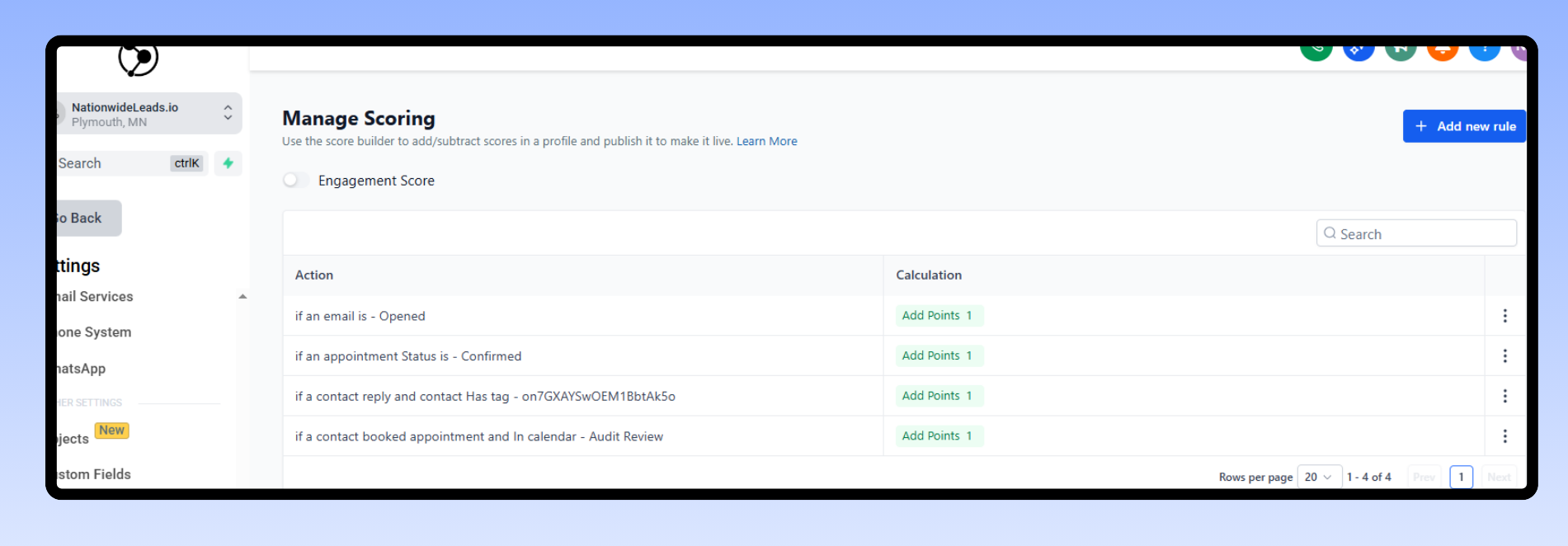
Health scores in a CRM demonstrate to you which accounts require immediate attention. These scores mix in usage stats, contract renewal dates, and feedback. These teams use dashboards to observe trends over time.
Perhaps a client’s satisfaction declines following a service modification. Feedback loops, such as surveys sent directly from the CRM, provide immediate insight. This data-driven approach allows CSMs to prioritize their attention where it matters most.
4. Scalable touchpoints
CRM-powered automation enables CSMs to engage lots of customers at once and still keep messages personal. The system categorizes contacts by deal size, region, or industry so every segment receives information tailored to their requirements.
Mapping the customer journey in the CRM drives timely check-ins from onboarding to renewal. Automated reminders and personalized messages keep teams on pace even as the client base increases.
5. Team alignment
CRM systems help to tear down silos between teams. With customer data shared, sales, marketing, and success teams all view the same updates. Performance can be monitored and communicated so all are aware of their status.
Periodic check-ins informed by CRM insights enable teams to establish new objectives and address disconnects. It keeps their efforts focused and lets everyone pull in the same direction.
Distinguishing your customer success toolkit

Customer success managers (CSMs) need more than a CRM to forge powerful, enduring customer relationships. A CRM is the natural home for all customer data—sales, contacts, activity. It frequently falls short for properly managing ongoing customer health and engagement. To achieve this, CSMs need to complement their CRM with the other pieces of software necessary to power a complete customer success toolkit.
This approach helps small businesses craft a defensible customer success strategy that drives retention and fuels growth.
The CRM foundation
At the core of any customer success program is the modern CRM. It consolidates each customer’s sales history, contact information, and engagement records into one location. Keeping everything flowing into your customer relationship management system is crucial for accurate tracking, which means every customer interaction, including calls, emails, and meetings, needs to be captured as they happen. This approach provides your team with a transparent snapshot and facilitates agile decisions.
Teaching your team how to use CRM functionality reveals its true potential. With features such as automated follow-ups, sales funnel tracking, and workflow integrations, teams leveraging a robust CRM system can stay on top of customer needs. For instance, by utilizing the CRM’s custom fields, tags, and reporting tools, a CSM can identify which accounts deserve attention or upsell opportunities.
Because CRM implementation primarily measures sales, it can overlook early signs of customer health or churn risk. Keeping your CRM fresh with new features and best practices ensures it remains effective. Frequent reviews help you identify blind spots in your process, enhancing the overall customer journey mapping.
For example, if your CRM has integrations with email marketing or service desk tools, connect them to create a more comprehensive customer profile. This integration can significantly improve customer communication and support interactions, ultimately leading to better customer retention.
The CSP enhancer
Customer Success Platforms (CSPs) play a pivotal role in modern CRM by bridging the gaps often found in traditional CRMs. They do more than just provide sales data; they capture crucial metrics such as product usage, support tickets, and customer satisfaction scores. By integrating your CSP with a robust CRM system, you gain valuable insights into both sales context and live health data on every customer interaction.
A CSP can automate essential tasks such as onboarding checklists, renewal reminders, and health score alerts, keeping your team proactive. For instance, if a customer’s usage declines or a support ticket remains unresolved, the CSP can alert your team for urgent action. This proactive approach helps prevent customer churn.
Integrating your CRM and CSP provides a unified view of every customer, empowering teams to visualize the entire customer lifecycle from the initial sale through renewal. This integration allows for rapid responses to optimize the customer experience.
It’s crucial to select CSPs that seamlessly integrate with your CRM, support workflow automations, and offer comprehensive analytics tailored to your business needs.
Essential toolkit checklist
CRM platform: Centralize all customer data, sales information, and touchpoints.
CSP software: Track product usage, customer health, and automate success workflows.
Communication tools include email, chat, and phone systems that sync with CRM/CSP.
Support ticket system: Log customer requests and issues, preferably linked to CRM.
Analytics dashboard: Aggregate data from CRM, CSP, and support tools for reporting.
Integration platform: Connect CRM, CSP, and other tools for a smooth data flow.
Training resources: Keep staff up to date on tool features and best practices.
💡 Quick Tip: An all-in-one platform like NationwideLeads enables you to centralize data, manage all communications, support clients, run analytics, marketing & much more in 1 spot cost-efficiently
Integrating CRM for maximum impact

Strategic customer relationship management integration lies at the center of customer success management (CSM) effectiveness. When modern CRM systems integrate with your business systems, marketing automation, and analytics capabilities, every touchpoint becomes smarter and more seamless. This integration enhances data accuracy, breaks down silos, and allows teams to respond to real-time insights effectively.
For small businesses in particular, ensuring that your CRM implementation integrates with your other tools isn’t a technical detail—it’s crucial for providing relevant, timely service and marketing. APIs allow you to integrate your CRM with marketing, finance, or support platforms, building a unified source of truth for your customer interactions.
Analytical CRM lets you visualize customer trends, identify bottlenecks, and make more informed decisions about where to optimize your customer success program.
Map the journey
Onboarding: Capture first contact, signup, and education milestones
Engagement: Monitor usage, feedback, and support requests
Expansion: Track upsell, cross-sell, and renewal cycles
Retention: Spot churn signals, satisfaction, and advocacy moments
Offboarding: Record exit feedback, follow-up, and re-engagement
Mapping customer journeys with CRM data allows you to share visual insights among your team. Diagrams and dashboards constructed from CRM metrics make it easy to identify where customers succeed or have difficulty.
This enables teams to iterate on strategies rapidly, perhaps pivoting to onboarding if that’s where drop-off spikes or personalizing retention touches if engagement lags. These common perspectives keep the team on target and create an environment of continuous improvement.
Bridge the data
Centralizing all customer data inside your CRM is critical for clarity. It eliminates fragmented records and increases accuracy so everyone — from sales to support — is operating with the same information.
CRM analytics can fill gaps, allowing you to identify correlations between customer activity and revenue or satisfaction metrics. Data governance keeps this info clean and reliable, which is key as your customer base scales.
When cross-department teams share CRM insights, it dismantles silos, triggers ideas, and results in more focused, relevant outreach.
Overcome friction
Consult your CRM analytics to identify friction points, perhaps a delayed support ticket response or a cumbersome checkout. Build playbooks and automation to even out these rough edges.
Automation can send reminders, route requests or update records, accelerating the customer experience. Consistent check-ins on your CRM setup catch new hurdles before they get deep, enabling you to fine-tune workflows and eliminate hidden roadblocks.
This all results in less frustration for your customers and a more efficient team.
Essential CRM features for success managers
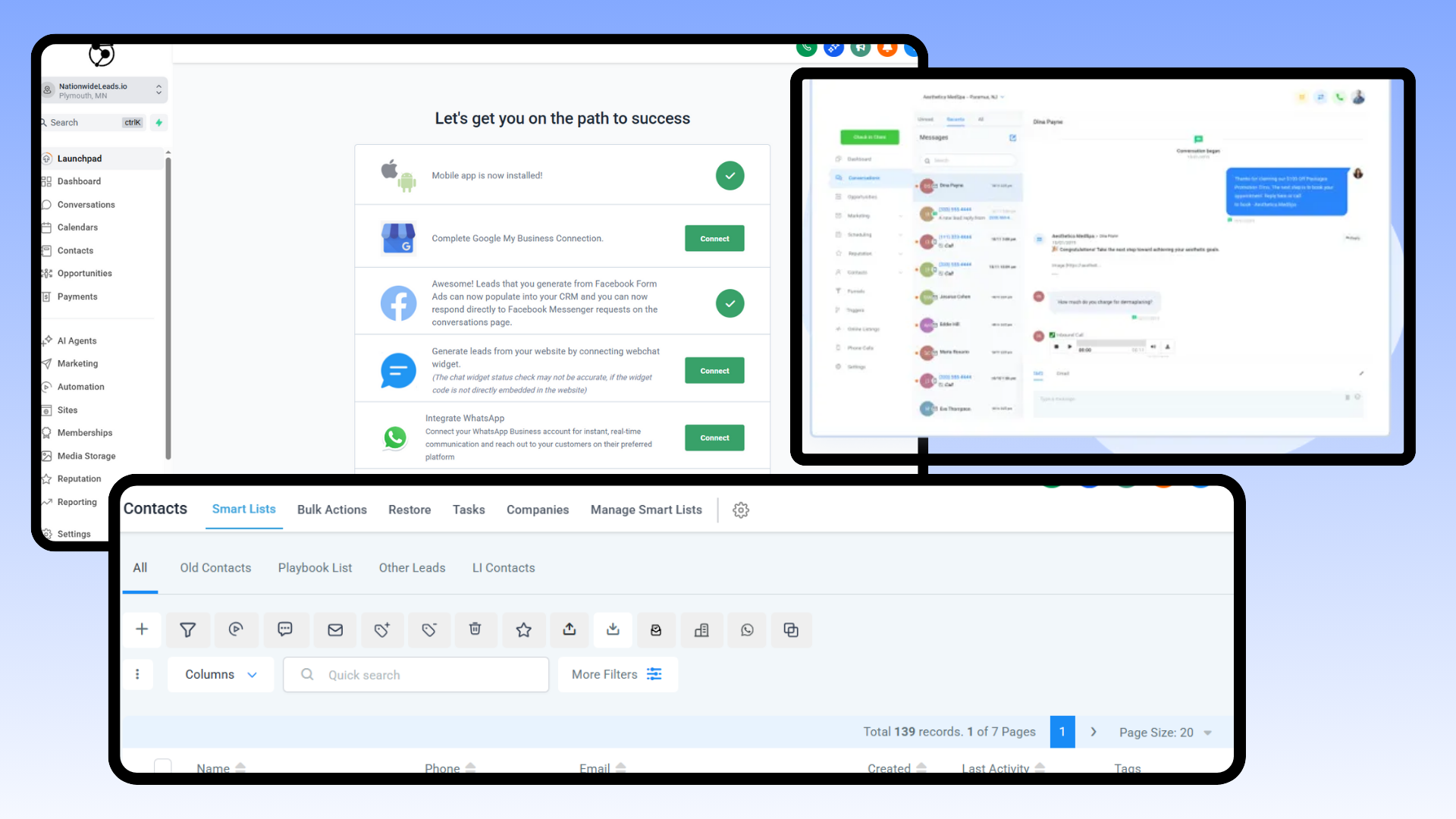
A CRM is the lifeblood of customer success management. It should provide a single, real-time view of every customer, connecting silos across sales, marketing, and support. The right CRM features empower teams to be productive, keep records up to date, and make every interaction count wherever they’re working from.
Strong integration with other business tools and buy-in from all stakeholders ensure the CRM truly fits your needs. Here’s what to look for:
Automation tools for repetitive tasks accelerate team workflows.
Customizable reporting dashboards for tracking customer success metrics.
High-level segmentation helps reach the right customers at the right moment.
Detailed communication logs to document every touchpoint.
Integration options that break down silos between business tools.
Collaborative features for shared access to customer data.
Tools to build self-serve resources such as help centers or training.
Real-time updates allow you to respond and follow up quickly and with information.
Automated playbooks
Automated playbooks inside a CRM help teams standardize success management. They provide explicit processes for dealing with common client problems. This makes sure everyone handles things the same way and customers receive uniform attention.
For instance, a playbook could walk a CSM through onboarding new clients, with prompts at each stage: send welcome email, book kickoff call, provide training video. Teams can check analytics to see which playbooks work best and tweak them as customer needs shift.
Feedback from teammates is invaluable, so keep playbooks fresh by updating them when you notice new trends or gaps.
Actionable insights
Great success managers don’t just collect data, they transform it into insight. Leverage reporting to identify trends in customer engagement or churn. Dashboards can highlight at a glance which segments need more support or which campaigns are generating results.
Sharing these discoveries with the team ignites inspiration and maintains focus. By reviewing CRM-generated reports frequently, you can shift strategy as client expectations shift, keeping your business nimble and responsive.
Communication logs
Maintain full records of each discussion. Communication logs are key for keeping tabs on previous conversations and for ensuring that nothing falls through the cracks. Everyone on the team can see updates, so if someone’s out, others can jump in without missing a beat!
It reviews these logs to identify patterns, such as delayed responses or repetitive inquiries, that could then be used to guide training or process adjustments. A transparent record translates into improved collaboration and reduced dropped follow-ups.
Segmentation tools
Segmentation allows you to categorize customers based on characteristics such as industry, company size, or product usage. This simplifies sending relevant messages and customizing outreach.
You might conduct a campaign for users in trial or provide power user tips to veteran customers. Monitor how various segments react with CRM analytics and adjust your strategy as customer behavior evolves. Keep criteria fresh so your messaging always strikes home.
The human element in a tech-driven world

Customer success is still very much about people, even in a tech-run world. There’s tons of discussion around automation, AI, and all the toys that grease the wheels. The true edge comes from knowing how to develop trust and maintain it. It’s the personal connections that customers recall. A handshake, a call that’s not on script, or a check-in email that speaks to an actual need—these will always trump any fancy dashboard.
While customers desire quick responses and tailored assistance from tech such as chatbots and messaging, studies show that real personalization can increase satisfaction by up to seventy-five percent. In other words, although tech makes things flat, humans make it fuzzy.
CRM platform like NationwideLeads facilitate the human element of tech world. While its platform's tech stack is designed like others to use AI or automation, it goes beyond that by enabling human interjection at multiple points in different process. For example, while you can use an AI chat bot to respond to website or social media chats, a human can interject at any time live.
Another human touch key point to consider NationwideLeads crm as an essential complementary tools for csms and customer success toolkit is their free onboarding to provide a good onset foundation for settling in quickly and done-for-you services that you can use at any time in your growth journey.
It’s key for CSMs to know how to read CRM data and not lose the real talk. The right platform can help with that approach. Training goes beyond just software. It’s educating people to see when a digit is simply a digit and when it indicates someone may churn or require assistance. A CRM tells you specifics—historical purchases, ticket resolution rates, preferred client channels.
It’s up to the CSM to convert those facts into smart questions and sincere conversations. If a customer consistently bypasses feedback forms, perhaps phone and inquire what’s lacking. If a big order gets stuck, don’t just send a status update; check in and show you care. This combination of reading the data and keeping it human makes all the difference.
Empathy is a craft, not a whim. Well client-serving teams know how to put themselves in their clients’ shoes even in this age of tech noise. A culture of comprehension begins at the summit. Leaders can lead by example, demonstrating genuine care in hard decisions or celebrating successes that came through listening, not selling.
When tech is all around us, it’s simple to overlook the little things, like a thank you note or a call on a birthday. They don’t cost a lot, but they create connections that endure.
There’s always a trade-off between fast and warm. Tech makes stuff happen. AI in CRM can increase team response speeds to work by thirty percent and intelligent order verification can reduce waiting by fifteen to twenty percent. Humans still want to be listened to.
It’s one thing to have customers in the door, but there’s data privacy, too. Customers have to know their info is safe and that there’s a real person behind the screen. Staying that human with smart CRM usage is what distinguishes CSMs.
Measuring the true value of integration

When evaluating how CRM solutions integrate with customer success management (CSM), you want to examine actual figures that impact growth, cost, and customer confidence. The three key metrics in the table below—retention rates, expansion revenue, and efficiency gains—measure the real value of CRM integration for small businesses.
Retention rates
Retention rates highlight how effectively a company maintains its customers. Following these figures in a CRM system allows you to observe trends, such as which customers are most inclined to defect or what actions result in improved fidelity.
For example, a CRM could indicate that customers who receive a monthly check-in email have a 15 percent higher renewal rate, which encourages you to automate this outreach. When you see retention dip, it guides you to check your onboarding, support, or product fit.
By taking action on CRM insights, you can trial adjustments such as quicker response times or post-support case follow-up. Teams who frequently check retention reports remain attentive to customer demands, leveraging CRM dashboards to identify early warning signs and intervene before a minor problem escalates.
Expansion revenue
Expansion revenue is additional revenue gained from existing customers via upsell, cross-sell, or renewal. With CRM analytics, you can check which products customers buy together or when they are receptive to add-ons.
For instance, if information reveals that users of a basic CRM plan upgrade after six months, you can build campaigns to offer targeted discounts at that point. CRM tools help plan and measure these campaigns, tracking which ones bring in more revenue per account.
Looking over these figures each month provides a reality check for customer success teams and informs future offers. Expansion revenue patterns reveal what is working and enable small businesses to concentrate on the best growth opportunities with existing customers, rather than constantly pursuing new leads.
Efficiency gains
Productivity boosts arise from eliminating manual labor and accelerating mundane tasks. A CRM can reduce hours on data entry, reporting, and follow-up by automating reminders or syncing data across systems.
Small teams experience big time savings, sometimes a few hours a week, by using templates for common customer emails or auto-logging customer calls. Validating these time savings supports the investment in CRM software and training.
If it used to take two hours and now takes 30 minutes, the statistics are self-evident. Periodic check-ins prevent teams from reverting to old habits and assist in identifying fresh opportunities to save time, such as integrating the CRM with other work applications or revising workflows as the business evolves.
Conclusion
CSMs owe a lot to a good CRM. It does more than just store contacts. It tracks each client, stores notes, and illustrates what works all together. A CRM helps detect patterns quickly. You know which clients require assistance and which ones thrive. No more lost emails or missed opportunities. Simple tools allow you to assign tasks, send updates, or celebrate wins with your team. Crave to please clients and reduce churn? A robust CRM like NationwideLeads is your secret weapon. The correct configuration clears your schedule for real conversations and real achievements. Give a CRM a whirl. See how it fits with your flow. Need a free trial or a demo? Get started and see why its one of the best tools for customer success managers.
Frequently Asked Questions
What is the main benefit of using a CRM for customer success managers?
A modern CRM assists CSMs by keeping client information organized, logging customer interactions, and managing reminders, resulting in better customer relationships and increased retention.
How does CRM integration improve customer success workflows?
Modern CRM integration pulls together information on disparate tools, simplifying data access and task automation for customer success platforms.
Which CRM features are most important for success managers?
Top features of modern CRM systems include contact management, task automation, and reporting, which empower success managers to enhance customer interactions and track customer advancement.
Can a CRM replace other customer success tools?
No, a modern CRM complements other tools by enhancing customer interactions. Fast friends can digest vast information in real time, serving as valuable relationship builders with great perspectives.
How can customer success managers measure the value of CRM integration?
Value in metrics such as customer satisfaction scores, response times, and retention highlights the impact of modern CRM implementation on customer interactions.
What role does the human element play in CRM-driven customer success?
Modern CRM systems automate many tasks, yet personal connections remain essential. Success managers should leverage CRM technology to enhance genuine customer interactions.
Is a CRM useful for global customer success teams?
Yes, a modern CRM enables teams scattered around the globe to have a common platform for customer interactions, data sharing, and workflow management.