Creating a small business social media content calendar for success
Like most calendars, a small business social media content calendar plans, tracks and posts updates on channels such as Facebook, Instagram and LinkedIn. Establishing a calendar keeps your posts consistent and timely, which saves time and reduces stress.
Owners and solopreneurs in particular tend to experience more powerful reach and results by operating from a defined schedule. To demonstrate how such a calendar works and why it matters, the bulk provides straightforward steps and advice for teams of any size.
Key Takeaways
Scheduling your professional social media content ahead of time aids brand consistency and generates a consistent flow of interesting content for every platform.
Clear, measurable goals that align with your broader business goals allow for more focused and trackable results.
By selecting the platforms that are appropriate for your brand and sharing relevant content on each channel, you’ll get the most bang for your buck.
Variety of content and a regular posting schedule keep your audience from getting bored and keep you on their radar.
By defining team roles and utilizing collaborative tools, you simplify the process and foster creative input from all members.
Continuously reviewing the performance data and remaining flexible ensure your strategy remains efficient and relevant as trends and audience preferences shift.
Table of Contents
Why your business needs a social media content calendar
How to build your small business social media content calendar
The psychology of content planning
Social media content calendar best practices
What is a social media content calendar?
Why should small businesses use a content calendar?
How often should I update my social media content calendar?
What tools can help create a content calendar?
What type of content engages small business audiences?
Can a content calendar improve my social media results?
Are there free templates available for social media content calendars?
Why your business needs a social media content calendar
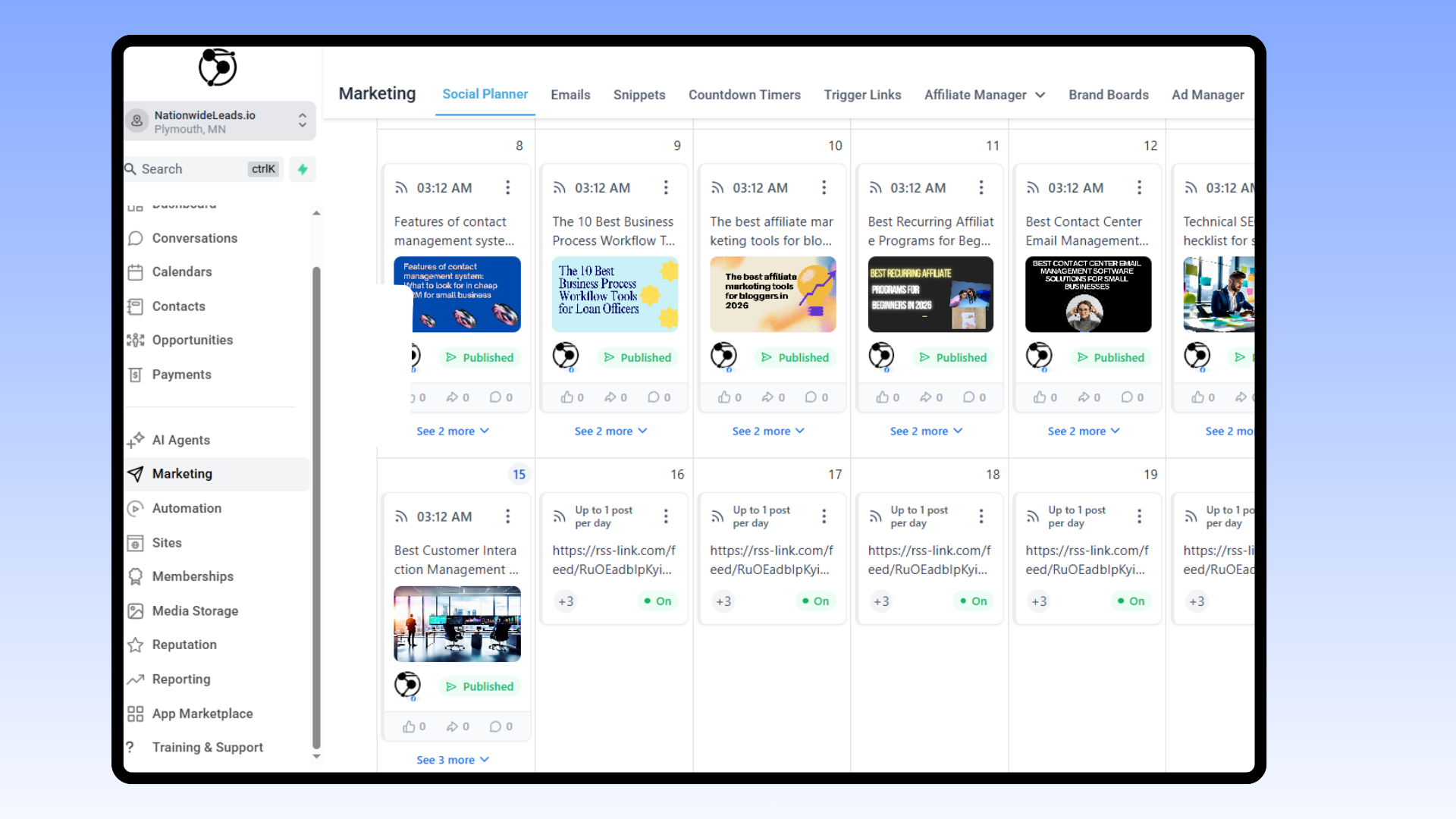
A social media content calendar is not simply a to-do list for posting content on social media. It’s an easy yet effective means of maintaining your business’ momentum and professionalism on social channels. Planning ahead with a calendar ensures that posts are timely, content is consistently fresh, and your brand’s voice is identifiable and trustworthy.
Most small businesses struggle with social media because they post sporadically or go dark for weeks. A content calendar is the solution. It transforms social media from a guessing game into an action plan that is easy to follow and monitor.
Helps keep content steady and on schedule
Builds a clear and steady brand voice across channels
Cuts down daily stress about what to post
Lets teams work together with less fuss
Simplifies identifying what works and what does not.
Stops last-minute scrambles for content ideas
Helps reach online goals by keeping posts focused
Frees up time for other tasks by planning ahead
Brand consistency is crucial for any little business. When you strategize your posts in advance, you’ll be able to ensure your brand colors, tone, and message are consistent across the board. If you post about a sale on Facebook, that same message should appear on Instagram, LinkedIn, or wherever else your customers look.
This establishes credibility. It helps make your business look consistent and authentic, which is what people crave before they purchase or contact. A calendar-based approach allows you to prepare for major events, holidays, or launches. You don’t miss out because you forgot or it was too late. Every post serves a specific purpose and aligns with your brand narrative.
It’s not enough to simply post. Equally as important is looking at the data. Scheduling your content with a calendar lets you see which posts worked. Did your how-to video get more clicks than a product photo? You can track likes, shares, and comments by date and type, then pick up on patterns.
If you know what works, you can do more. If something falls flat, it’s easy to switch gears. That way, your strategy is always evolving, not caught in a rut.
For teams, a shared content calendar is an absolute necessity. Everyone is in the loop about what’s going out and when. This translates to less confusion and improved collaboration.
It’s simple to divide tasks—one fellow writes, another designs and a third proofreads before posting. Explicit deadlines for every phase—writing, editing, scheduling—ensure no one is left guessing or scrambling at the last minute.
How to build your small business social media content calendar

A content calendar provides your business a guide on what, when, and where to post. It’s time-saving, keeps your brand voice consistent, and allows you to track post performance. Picking a weekly or monthly theme organizes your content and makes planning simple.
With templates, you don’t have to start from square one every time. This allows you to spend more time on audience growth, not maintenance.
Key steps to build your content calendar:
Define clear goals for social media
Choose the right platforms for your audience
Select a diverse mix of content types
Set a posting frequency you can keep up with
Assign roles and responsibilities for content tasks
1. Define goals
Establish specific goals for your social media, such as increasing engagement or followers. Be sure each one aligns with your broader business objectives, for example, generating more sign-ups or increasing brand awareness.
Determine which metrics are most important, such as likes, shares, comments, or clicks to your website. Monitor your progress with periodic checks and adjust your goals if the figures indicate you should.
Analytics can help you identify trends or gaps. Check your metrics regularly to ensure your goals remain relevant and your messaging aligns with your overarching strategy.
2. Choose platforms
Find out where your customers hang out the most. Maybe they’re on Instagram for images, LinkedIn for B2B, or Facebook for neighborhood news. Each platform has its strengths.
Instagram is perfect for images, Twitter/X is for quick news, and LinkedIn is for professional updates. Consider organic reach versus paid ads. Instagram or Facebook might be fine for a small business to grow organically.
LinkedIn usually requires some paid boost. Be on the lookout for new platforms or features, such as short videos, that could provide an advantage.
3. Select content
Variety is the spice of life. Mix up your posts! Mix in how-tos, short videos, graphics, and customer stories. Include some user-generated content to highlight actual experiences.
Run seasonal posts for holidays or industry events and jump on trends that fit your brand. Figure out your content using a calendar template. Google Sheets is free and easy.
This allows you to identify gaps and keep your feed fresh. Organizing by weekly or monthly themes helps you brainstorm and ensures your posts relate well to each other and your business goals.
4. Determine frequency
Determine a posting schedule that fits your team and your time. Facebook, for instance, does well with three to five posts a week, Instagram four to seven, LinkedIn two to four, and Twitter/X one to three times a day.
Don’t overwhelm a channel. Just watch your engagement numbers to see what days and times work best. Adjust your schedule if you notice a dip or peak in results.
Tools like NationwideLeads assist with planning and automating posts.
5. Assign roles
Determine who does what, even if you’re a team of one. Take advantage of project tools to keep track of tasks. Encourage input and fresh ideas from all parties. Consider done for you social media as option not only to set the right foundation for you, but use season experts to get it done.
Tools like NationwideLeads offer the flexibility of DIY and done for you in the same platform. You can use done for you social media experts to get you started on the right foot, create the processes that you can later take over.
You can also hire them at anytime in your growth journey to save you the time spent planning and generating content. Check roles every few months to ensure they still align with your business needs.
Content ideas that engage

A small business social media content calendar keeps your posts on track and builds stronger ties with your audience. Planning ahead, anywhere from a week to a few months, means you post on time and don’t scramble for ideas. Mixing up your content — photos, videos, mini stories, or polls — keeps your feed fresh and your followers engaged.
Here are some battle-tested small business content ideas that want to engage and grow.
Post behind the scenes snaps to humanize your brand. Day in the life, office shots, or quick teaser videos of your team in action allow visitors to connect with the genuine personalities behind your enterprise. For instance, you might demonstrate how you prepare for a product launch or post a time lapse of your workspace prior to opening.
💡 Sharing stories of small wins, what inspires you, or even what went wrong and how you fixed it gives your brand a real, honest feel. It’s straightforward and intimate, and it cultivates credibility.
Create valuable, instructional content that demonstrates your knowledge. Tips, how-tos, and quick facts assist your audience in learning something new and addressing actual issues. For instance, a bakery could post how-to frost a cupcake videos, or a small tech firm could share tips for better data security.
💡 Addressing FAQs and demystifying industry jargon in simple language assists too. You can employ Q&As, myth vs. Fact, or straightforward infographics to simplify the more complex topics in a way that anyone can understand. Content of this kind makes your brand a destination in your industry.
Show off customer love with testimonials and success stories. Sharing real reviews, before and after photos, or case studies provides social proof that your business produces results. Request happy customers to allow you to publish their testimonials and, when you can, include photos or video clips.
For example, a fitness coach might post a client’s story, or a marketing consultant might post a client’s growth charts. These tales comfort new customers and inspire existing ones to participate and spread the word.
Mix in seasonal or holiday posts, like ‘it’s a global observance’ or ‘interesting fact about the day’ type posts to keep things timely. Try ‘this or that’ polls, quick quizzes, or get people’s take on new products to incite curiosity and interaction.
Batching your content, a few posts at once, saves you time and ensures consistency. Others report that four to five posts a week is ideal, so focus on what works for your audience and your team’s capacity.
Tools and templates to use
Selecting the appropriate tools and templates for a social media content calendar can transform the way a small business operates its online campaigns. A lot of small teams or solo owners just need something quick, easy, and cheap to keep things going. The market has matured, with entry-level and deeply advanced solutions that fit every need and ability.
A social media content calendar template is a good place to start for most small businesses. Google Sheets is a favorite as it’s free, works in real time and can be easily set up for collaboration. Templates tend to have columns for each network, a row for every day, and brainstorming prompts such as “Fun fact” or “True/False.
There are many downloadable templates in Google Sheets, Excel, and even Trello boards, so you have an option for every workflow. Some templates are constructed for daily content, while others extend over weeks or months, which is useful for organizing larger campaigns or following seasonal initiatives. A monthly planning view ensures you don’t miss any big dates or marketing pushes.
Content calendars can connect directly to publishing tools such as NationwideLeads You can schedule in the template, then pop posts directly to your social channels. It reduces time, decreases mistakes, and simplifies the process of visualizing what’s ahead. Certain templates feature a content repository—a place to house reusable posts or concepts.
This works great for evergreen content that plays on a lot of channels. Analytics tools add a new layer by monitoring post performance. Tools like NationwideLeads have analytics built in, so you can learn which posts get clicks, likes, or comments. This feedback loop is crucial for learning what works, so your next month’s worth of content can be even sharper.
Even a basic spreadsheet can incorporate columns for performance metrics, allowing you to spot trends at a glance. Collaboration tools are important when more than one person manages the calendar. Trello or Notion enable teams to assign work, leave feedback, and monitor progress.
This way, everyone stays on the same page and you can circumvent gaps or double posting.
The psychology of content planning

A clever content calendar is not simply a schedule. It can influence the way small businesses present themselves online and the way their audience perceives them. A plan prevents last minute panic, allows you to space out work, and provides you more control of your day. A lot of entrepreneurs are less nervous when they have an idea of what they’re going to post next week or even next month.
Sixty-four percent of marketing high achievers have a documented content plan, so a plan isn’t just useful; it’s a hallmark of people who achieve results.
Figuring out what your audience desires is the initial step. Content that corresponds to your readers’ actual needs, interests, and pain points will receive more views and sharing. Start by collecting input, seeing what your audience enjoys most, and reviewing analytics.
For example, if your audience consists of busy parents, then time-saving tips or quick recipe posts might attract the most attention. If you’re aiming for freelancers, then stories about new tools or self-management will probably strike a chord. When consumers encounter content that seems designed for them, they tend to interact with it and trust your brand.
STORYTELLING MAKES YOUR POSTS UNFORGETTABLE. They recall narratives better than cold statistics and identify with brands that communicate authentic experiences. Customer success stories or behind-the-scenes looks at your team, even if it’s just a day in the life, can be very effective.
A boutique owner might talk about how a customer’s feedback influenced a new product line. These types of stories humanize your brand and foster loyalty over the long term.
Visuals go quickly. A compelling image or a brief video can catch attention as people scroll. If you’re trying to explain something, use basic graphics, photos, or infographics. For instance, an accounting firm might display a before-and-after image of one client’s tamed books.
A bakery might share a short video of bread being pulled from the oven. Visual content stays in the mind and aids your message in spreading.
Experiment with various formats. Mix in short posts, live Q&A, polls, and how-to videos. Certain audiences adore fast how-tos, while others desire more in-depth guides or infographics. Experiment and observe your traffic.
If polls get more clicks, use them more. Flexibility is crucial. Reserve room in your schedule to respond quickly to trends, news, or support.
Check your outcomes frequently. See what’s working and what isn’t. Change your plan if you discover new trends or if some content bombs. This continuous editing keeps your content crisp and your readers engaged.
Social media content calendar best practices

A social media content calendar isn’t merely a schedule. It’s a must-have for small businesses to schedule, plan, and monitor content across platforms. With a content calendar, teams operate from a central repository of approved, on-brand posts, which reduces confusion and saves time.
This arrangement prevents the typical eleventh hour scramble, forgotten deadlines or the frantic file search. Choosing the appropriate calendar tool is important. Some are best for solo users, while others work for larger teams with additional features for sharing and feedback.
Flexible planning views such as daily, weekly, or monthly assist in meeting the needs of your team and business size.
A calendar is not merely a list of posts. It should incorporate a mix of original company content, user-generated content, and curated material from trusted sources. This blend makes your social channels engaging and appeals to a broader audience.
Planning posts ahead is one of the easiest ways to maintain a flow of content and prevent falling silent. Regular posting establishes trust and keeps your following returning. By scheduling out content in advance, you have the opportunity to post when your audience is most active, which can increase engagement and reach.
Tracking and measuring what works is critical. Every social network provides its own insights. Make time to check these numbers regularly. Consider clicks, likes, shares, and comments.
Reserve a consistent time per week or month to check in on progress. That means you can observe what is effective, identify patterns, and adjust your calendar accordingly. Routine audits let you know if your content is supporting your business objectives. If not, you can rapidly adjust your strategy without lagging behind.
QUALITY still comes before QUANTITY. Here’s a tip: it’s better to post a handful of thoughtful pieces than inundate your streams with low-value blurbs.
Try to create content that provides value, creates conversation, or assists your readers. Each post needs to reinforce your brand and advance your marketing objectives.
Most importantly if you are struggling for time or to get started, consider a cost-effectively done for you social media option to build a good foundation and practice that you can take over. It pays off long run while saving you the time and effort short term
Conclusion
To run a small business, having a grip on a social media content calendar simply makes sense. Time-saving, post-organizing, and buyer engagement are important. Handy little tools and templates provide you a nice jump start. Simple twists personalize your calendar to your brand and goals. Catch-all classics like celebrating wins, telling authentic stories, and offering quick tips forge organic connections with customers. With a plan, you eliminate the stress and appear steady. Need help setting one up or want done-for-you tips? Contact us at NationwideLeads. We get you set up fast and keep it smooth.
Frequently Asked Questions
What is a social media content calendar?
A social media content calendar is a strategy for pre-planning your posts and campaigns. It aids in content coordination, time efficiency, and platform consistency.
Why should small businesses use a content calendar?
A content calendar makes you more efficient, keeps your messaging consistent, and provides a way for you to track what works. It is easier to plan campaigns and engage your audience.
How often should I update my social media content calendar?
Refresh your calendar monthly. Check your results every week or so and amend your needs.
What tools can help create a content calendar?
Common options are Trello, Google Sheets, and NationwideLeads. These tools provide templates and automation that simplify planning.
What type of content engages small business audiences?
Post a healthy blend of tip posts, behind the scenes posts, customer stories, and interactive questions. Visual content such as images and short videos are more engaging.
Can a content calendar improve my social media results?
Yes. Your content calendar ensures you post regularly, stay on message with your business objectives, and track what connects with your followers. This promotes engagement and growth.
Are there free templates available for social media content calendars?
Sure, a lot of sites provide free templates. Find downloadable spreadsheets or built-in templates from planning tools to jumpstart the process.