Features of contact management system: What to look for in cheap CRM for small business
Contact management system features keep your small business leads, clients, and conversations organized in one place. Users receive features to record contact details, schedule follow-ups, and access a complete history of discussions or transactions.
Most systems provide alerts, memos, and easy methods to organize or locate individuals quickly. Built-in sharing makes teamwork effortless. All of this is designed to reduce confusion, save you time, and make each conversation meaningful for your company.
Key Takeaways
A contact management system is more than a repository of names and phone numbers. It deepens customer connections and simplifies communication for businesses worldwide.
Fundamental functionality such as centralized databases, interaction tracking, task automation, and integration facilitates companies to organize, analyze, and act on customer data effectively.
Centralized contact databases ensure everyone on your team has the right information at the right time. They optimize your sales funnel and lead management.
Interaction tracking and task automation make follow-ups timely and personalized, increasing customer delight and freeing up your staff's precious time.
Free tools have hidden costs and security risks that can hold a company back, so investing in a reliable, scalable CRM is critical.
Predictive analytics in contact management systems can help businesses anticipate customer needs and drive long-term success.
Table of Contents
Core features of contact management system
The hidden costs of free tools
Choosing a cheap CRM for small business
The future is predictive contact management
What are the main features of a contact management system?
How does a contact management system benefit businesses?
Is a contact management system just a digital address book?
What should I look for in a cheap CRM for small business?
Are free contact management tools really free?
Beyond a digital address book

Contact management is about more than just an electronic address book. For SMBs and solopreneurs, it’s the foundation of building meaningful, resilient connections with customers, partners, and leads. By recording every conversation, interaction, and note, a good system transforms ad hoc touchpoints into a cohesive map of the customer’s path.
That means you don’t just know who your contacts are, but what they want, how they interact, and what brings them back. Good contact management lets you identify trends, prioritize high-value leads, and answer queries quickly, which is essential when you’re a lean operation.
Having it all in one place, with validation rules, reduces errors and makes sure everyone stays on the same page. For instance, if you operate a boutique marketing agency, appropriate validation implies you no longer have to stress about duplicate emails or missing information when dispatching a campaign.
Periodic cleaning of your database every so often, merging duplicates and updating stale records saves hours every week that would otherwise go to fixing mistakes or chasing down the right info. A healthy system mitigates stress and confusion when team members move on or new staff need to come up to speed.
Contact management is about more than just storage. It’s about insight too. When integrating your contact database with applications such as email marketing, help desk, or invoicing software, you can monitor each stage of the customer experience.
For example, a bakery owner can see when a customer ordered, if they opened a follow-up offer, and if they responded to a feedback survey within a single dashboard. This allows you to quantify what’s effective, adjust your strategy, and be a more intelligent entrepreneur.
Here’s why the right setup from the get-go is so important. Onboarding decisions such as which fields to use, how to tag contacts, and what validation rules to establish can affect your business for years.
💡 Instead of looking for a free CRM that is not scalable long term, with the right cheap CRM software, you can obtain free onboarding and more features to help you plan effectively long-term
Security is important, too. Features such as role-based access control, two-factor authentication, and data encryption guard sensitive details and assist you in meeting regional regulations whether you’re located in the US, Canada, or elsewhere.
This builds trust with your clients and keeps your business secure.
Core features of contact management system
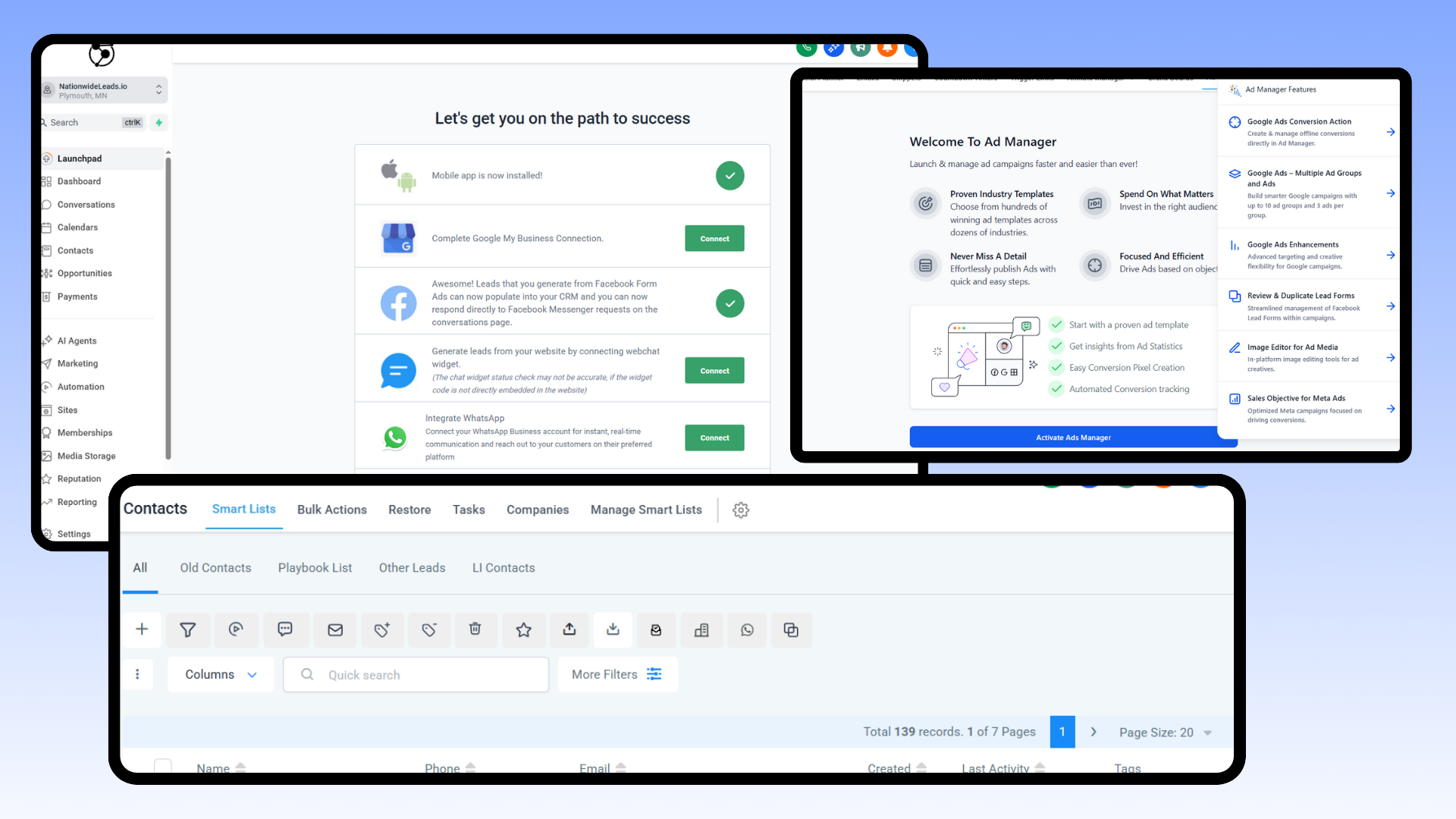
A contact management system organizes the way small businesses manage customer data, simplifying day-to-day operations. At its simplest, this kind of software keeps information such as names, emails, phone numbers, and company information all in a single location.
The software allows users to categorize contacts by status, industry, or any custom field, making it easier to follow leads and keep contact profiles current across devices and channels. Security features like role-based access, two-factor authentication, and encryption assist in keeping sensitive data secure.
The best systems allow integration with other marketing or sales tools for a seamless workflow.
Essential features often include:
Centralized contact database with robust sorting and filtering
Interaction tracking for calls, emails, meetings, and notes
Task automation for follow-ups, reminders, and email campaigns
Integration with third-party tools and CRM software
Data analytics for insight into customer behavior and campaign performance.
1. Centralized database
A centralized database stores all customer information in one safe place, so users can quickly locate and edit information such as phone numbers or emails. Data synchronization across devices means the whole team is always up to date, regardless of where they work from.
This arrangement results in fewer mistakes and less time hunting down or fixing old records. It simplifies lead management, making it easier to prioritize sales efforts and keep prospecting organized.
With one source of truth, a change made in one channel shows up everywhere, which is critical for businesses managing contacts across multiple touchpoints.
2. Interaction tracking
Tracking each call, email, and meeting gives you a detailed picture of how every customer interacts with your business. Over time, this accumulates a full communication history that assists in personalizing future interactions and increasing happiness.
Teams can identify trends, like when the optimal time to contact is or which channels receive the highest engagement. By analyzing these trends, you can get a sense of customer needs, which makes it easier to target your offers or messages.
For sales teams, seeing past interactions translates into smarter follow-ups and fewer missed opportunities.
3. Task automation
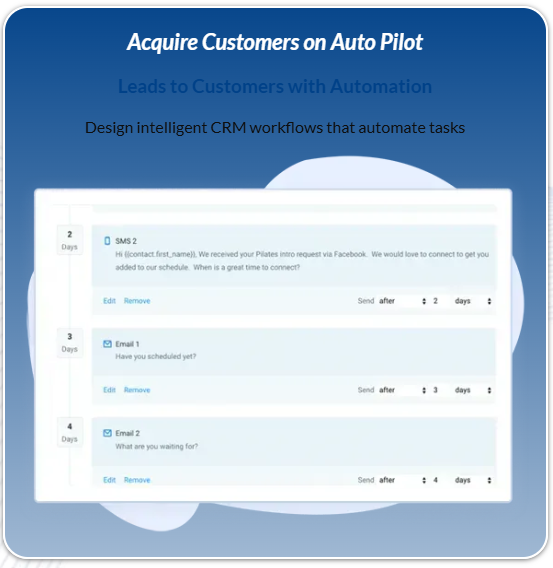
Task automation deals with the drip work, allowing you to focus on the more valuable work. Reminders and follow-up emails can be scheduled automatically, so important deadlines or opportunities are never missed.
Automation streamlines your workflow, eliminating error-prone manual entry. It means marketing emails or customer updates go out on time, every time.
Teams can then dedicate their efforts to creative or strategic tasks versus getting stuck in the minutiae, pushing productivity through the roof.
4. System integration
Integrating your contact management system with other business tools, such as your Point of Sales platform or project management apps, brings all your data together. This lets you seamlessly share data between sales, marketing, and support teams.
By integrating with popular software, including Gmail, Outlook, and Slack, there’s less context switching and smoother workflows. It makes data flow automatically, cutting down on duplicate work and making responses faster.
Customers get a smoother experience because teams work from the same up-to-date information.
5. Data analytics
Data analytics tools integrated into contact management systems assist businesses in identifying effective strategies and areas for improvement. By analyzing customer behavior and campaign outcomes, teams can identify patterns and optimize tactics.
Analytics reveal which messages resonate and which customers are more engaged. This simplifies tailoring marketing and sales pitches.
Data-driven decisions are more likely to result in satisfied customers and retention because they are informed by real insight, not speculation.
💡 A cheap CRM for small business is more cost-effective long term to elevate your growth than free ones. With internal analytics and integrated external analytics like Google Analytics in one place, you get better strategic insights and decision making analytics
Why your business needs one
A contact management system provides small businesses with a very real opportunity to develop durable customer relationships and differentiate themselves from the crowd. Today, with such a volume of communications occurring simultaneously, it becomes difficult to maintain accuracy in the specifics. A solid system keeps all client info in one place, so you can quickly identify your best customers, their preferences and when they were last contacted.
That translates into addressing their needs more quickly and precisely, which is crucial when people demand fast and individualized service. Key competitive advantages and higher sales potential come from using a contact management system:
Quick access to all customer data for better service.
Easy-to-use tools segment and tag contacts by interests, purchase behavior, or location.
Automated follow-up, renewal, or birthday reminders increase loyalty.
Simpler internal sharing ensures everyone on your team is in the loop.
Tighter sales tracking and stronger forecasts with built-in reporting.
Less time spent on manual data entry means you can spend more time selling.
Complete history of customer correspondence reduces the chance of slip-ups.
Potential to identify loyal purchasers or consumers primed to upgrade so upselling is organic.
Keeping track of and categorizing all of your clients, even those with a small customer list, becomes complicated as your business expands. A contact management system allows you to segment lists, provide updates to the appropriate people, and identify trends in what customers are enjoying or complaining about.
Consider a seasonal business. Being able to identify who purchased last year and send them helpful reminders at just the right time can be the difference between making or losing a repeat sale. You can even automate emails or texts for events and offers, so no one falls through the cracks. For service businesses, a ticket system and call reports help you repair problems more quickly and maintain a clear record of every instance.
The right contact management tool keeps your finances in line. By monitoring invoices, payments, and open quotes in addition to customer data, you reduce billing mistakes and can see the status of every deal at a glance. This is key in sectors with lengthy sales cycles or products with limited shelf lives, where timing is crucial.
Being adaptable is important. Customers’ needs change and a strong contact management solution makes it simpler to shift how you work. Whether you’re a solo founder or you run a team, having the right system in place means you’re always prepared to provide seamless personalized service and identify new sales opportunities ahead of the curve.
The hidden costs of free tools
Small businesses often begin with free contact management tools, thinking it’s money saved. ‘Free’ usually implies trade-offs. These trade-offs can decelerate growth, create security issues, and generate additional labor, which are expenses that creep and accumulate over time.
Free tools have limits. Most limit the number of users you can add or the amount of data you can store. Features such as automation, deep reporting, or workflow tools tend to be absent. As your business grows, you need these features to track leads, follow up quickly, and make sure no customer slips through the cracks.
A free tool that only lets you add two people or won’t integrate with your email or invoicing platform can ultimately hinder you. For instance, if you want to send out follow-up emails to new leads, you’ll be copying and pasting details by hand, wasting time and risking errors.
Security is yet another big concern. Most free tools don’t provide robust protections for your data. Your customer information—names, emails, phone numbers—is priceless. These free tools might not encrypt your data or might store it in hackable ways.
If your customer list leaks or is lost, it’s not just inconvenient—it’s a risk to your reputation and may even lead to legal trouble depending on privacy regulations where you operate. Without transparent policies about what they do with your data, you might be stuck or at least seriously stuck if you want to migrate or delete later.
Manual labor is another hidden expense. With minimal automation or poor integrations, you’re likely to be updating records, scheduling calls, or constructing reports manually. This not only cannibalizes your workday but injects mistakes.
If you’ve got dozens of leads a week, that’s a lot of time wasted on tedious, error-prone grunt work. This time lost prevents you from instead focusing on growing your business or serving clients. Spending a little on a cheap CRM is ultimately more cost effective
As you scale, these free tools can even get more expensive. Lead volume increases, your team expands, and sales become more complicated. Suddenly, you’re managing systems or copying and pasting data between tools.
Data can get lost, reports can be off, and follow-ups missed. You could end up paying for premium features or paying someone to deal with the chaos—expenses that pile up fast. In the end, what appeared to be a free solution can end up costing more in time, money, and lost sales than a paid system would have from the start.
Choosing a cheap CRM for small business

What it really means to pick a cheap CRM for a small business It’s about maximizing value from features that resonate with your business today and that can grow with you. Most small business owners need a CRM to keep track of leads, clients and follow ups without complicating things or inflating costs.
Even so, the choices are dizzying, with every platform touting varying benefits and technical jargon. To simplify the decision, it helps to break things down with a straightforward checklist.
A useful checklist for affordable CRM selection should include: cost per user per month (always compare in the same currency, like USD), available automation features, minimum storage (at least 10 GB), level of customer support, user interface design, integration with other tools, mobile access, and scalability.
For price, beware of hidden fees as certain platforms charge for standard add-ons such as additional storage or assistance. Automation is important; seek out platforms that allow you to configure basic workflows, like lead assignment or follow-up reminders, to reduce manual labor.
Ensure the CRM suits your current size but can also manage additional contacts, users, and records as your business expands. That way, you won’t have to switch later on.
User-friendly interface is another must. For small businesses, the CRM needs to be user friendly right from the start. A neat, customizable dashboard lets you view your sales pipeline, schedule, or task list without menu-mining.
This is particularly useful for entrepreneurs who wear many hats and have to move quickly. Excellent customer care, whether by chat, phone, or email, can really matter, particularly when first setting up or when things go awry.
Just about all of these cheap CRMs include onboarding help, training videos, and a searchable knowledge base, which can save hours of frustration.
Scalability is important, even if you’re starting small. A scalable CRM uses cloud storage, meaning you can add more users or features as your needs change without switching systems.
Cloud-based options allow you and your team to access the platform from anywhere on any device, which can be a huge advantage if you have remote employees or travel frequently.
Integration is another key aspect. Check if the CRM connects smoothly with popular tools like email, calendar, invoicing, or marketing apps. Or better yet has all of them saving you multiple subscription. The best provide plug-and-play connections to over 40 other business tools, saving time and preventing data-entry mistakes.
The future is predictive contact management
Predictive contact management is transforming the way small businesses and solopreneurs utilize CRM. With more data than ever, contact management is now predictive, harnessing AI and machine learning to spot trends and patterns. It’s how businesses will know what customers want before they even ask. Predictive analytics tools are not just for big companies anymore. They are now cheap and easy enough for microbusinesses and side gigs to begin deploying.
AI predictive analytics are now a must-have feature. More companies are adopting it to get ahead. A system equipped with predictive tools sorts through enormous contact lists, tracks behavior, and flags top leads. Machine learning models such as Random Forest, Gradient Boosting, and Neural Networks assist in identifying patterns in buyer behavior, enhancing predictive accuracy.
These tools can now predict which prospects are most likely to buy or which customers will head for the exit. That can help reduce customer churn by up to 15%. That translates to increased customer retention and revenue.
Sales forecasting and lead generation get a major boost from predictive contact management. With improved forecasting, you’re able to plan your campaigns, set goals, and wisely allocate your budget. If you know which leads convert, then you can focus on those and stop wasting time on cold leads.
For companies that have implemented predictive contact management, sales revenue increases by 25 percent, and sales costs decrease by 30 percent. It makes a big difference, particularly for small teams that don’t have resources to waste.
Personalizing the customer experience is simpler with predictive insights. Systems can suggest next steps, like what content to send or when to follow up. Customers notice when businesses remember. Actually, 75% of people want brands to provide a personal touch and will abandon if they don’t.
Predictive contact management allows you to treat every single contact as a person, not just an entry in a spreadsheet. For instance, a flower shop can send you pre-birthday or anniversary reminders. A bank can highlight customers who need a check-in. That sort of attention keeps people returning.
That’s why predictive contact management is the future. The worldwide market for AI-driven contact management will reach $82.9 billion by 2025, expanding at a compound annual growth rate of 33.5 percent. The emergence of contact center analytics, increasing at 18.5 percent per year, indicates more individuals are relying on data to inform their decisions.
By introducing these modern tools into your business, you position yourself to compete and prosper, not only now but going forward.
Conclusion
Contact management tools do much more than just hold names and numbers. They assist people in following leads, taking notes in common, and preventing lost sales. Great systems fit tight small team budgets, save time, and cut stress. They allow users to save emails, view chat transcripts, and keep up with each transaction. Even the fundamentals, like smart tags and reminders, assist busy founders in staying on top of actual humans, not just information. Free options seem great, but they camouflage caps that drag you down as your business expands. Choosing the optimal CRM early not only provides peace of mind but simplifies every day. Want to check out how a real CRM can help your business? Come experience NationwideLeads and witness the difference for yourself!
Frequently Asked Questions
What are the main features of a contact management system?
Contact management system usually covers contact storage, notes, activity tracking, communication logs, search, and integration with email or messaging. These are great features that let users organize and manage contact information.
How does a contact management system benefit businesses?
About: features of contact management system It centralizes customer data, enhances team collaboration, and simplifies communication. This translates into improved customer relationships and more streamlined workflows, enabling companies to scale and retain clients.
Is a contact management system just a digital address book?
No, it goes way beyond that. It records communications, follows up on tasks, and integrates with other business tools, so it’s a contact management system.
What should I look for in a cheap CRM for small business?
Focus on usability and key functionalities such as a contact repository, task management, and integration capabilities. Look for dependable customer service, scalability, and features that fit your business.
Are free contact management tools really free?
A lot of free tools are limited in their features or storage or lack support. Others necessitate paid upgrades for advanced functions, resulting in hidden costs over time.
Can contact management systems predict customer needs?
Certain sophisticated systems employ AI to examine customer information and anticipate actions or preferences. This allows businesses to tailor interactions and predict customer needs to provide superior service.
Is a contact management system suitable for global teams?
Yes, nearly all newer systems accommodate multi-user access, cloud storage, and data sharing. They enable global teams to collaborate and keep contacts up to date, no matter where they are.