Email campaign trigger strategies to warm and close leads faster with CRM features
Email campaign trigger strategies employ predefined rules to deliver emails when a recipient takes action, such as registering or clicking on an email link.
Small businesses can use these triggers to follow up quickly and stay top of mind with leads. For example a loan officer can send CRM ringless voicemail drops right after clicking to warm leads faster. Triggers make every email count, reducing wasted time and increasing response rates.
For automation amateurs or solopreneurs with no techy experience, smart trigger with drag and drop capabilities plans enable email to do more work at no additional expense or hassle.
Next, check out the best ways to use them cost-effectively.
Key Takeaways
This is what makes triggered emails so powerful: they deliver the right action or message at the right time, allowing you to increase customer engagement and retention.
Moving past newsletters means you can send more targeted, dynamic email content or actions like CRM ringless voicemail drops so communications are more relevant to each recipient’s behavior and interests.
Mastering your email’s send time and combining it with predictive sending can increase open and clickthrough rates and improve campaign performance.
By building automated workflows around customer milestones, abandoned carts, and re-engagement, you keep the relationships alive and encourage continued interaction.
Personalizing emails based on behavioral, purchase, and contextual data creates a more meaningful connection and generates more responses.
Consistently track campaign effectiveness by setting specific objectives, utilizing analytics platforms, and conducting A/B tests to optimize your email marketing performance.
Table of Contents
Essential email campaign trigger strategies
Designing your email campaign process flow
Trigger your CRM ringless voicemail drops
Personalization beyond the first name
What are triggered emails in an email campaign?
Why are trigger strategies important for email campaigns?
How do I design an effective email campaign process flow?
What is CRM ringless voicemail drop integration?
How can I measure the success of triggered email campaigns?
Why triggered emails matter
Triggered emails are more than a marketing buzzword; they are a well-established way to increase engagement and revenue and lessen churn. They matter when it is easiest for customers to take the next step. Triggered emails are critical.
A recent report revealed that triggered email journeys alone can generate a 157% lift in revenue and a nearly 300% increase in total interactions in just six months. For small businesses, it is more than a nice-to-have; it is essential for staying top of mind and making every customer interaction matter.
Thoughtful, personalized, just-in-time emails make the path of your subscribers' experience with you more fluid and can result in much deeper loyalty and more repeat sales.
Beyond the newsletter
Your usual newsletter is a fixed, boring thing – quietly ignored in the background. Triggered emails allow you to get beyond this by sending messages in response to actual behavior, such as looking at a product or abandoning a cart.
This direct connection to customer behavior makes your emails feel more personal and less spammy. Segmenting your audience and dynamic content lets you tailor each message to individuals or groups, rather than blast everyone with the same update.
For instance, you could send new subscribers special offers, cart abandonment reminders, and gratitude to your most devoted customers. Changing your tune with a little order confirmation, birthday wish, or product recommendation keeps it fresh.
E-commerce especially benefits from these tactics, as abandoned cart emails by themselves recover sales and generate additional income. It is no longer optional to make your emails mobile-friendly. More than half of emails are opened on smartphones or tablets, meaning mobile-first design is crucial.
The timing advantage
It’s what makes triggered emails different to send them at the right time. Instead of waiting for a weekly or monthly send, trigger workflows can react within minutes or hours of customer behaviors. Research shows that emails sent within one to three hours post-engagement receive the highest response rates.
Predictive sending, where systems keep tabs on when each subscriber is most likely to open, can further hone your timing. Seasonal trends matter. A time-sensitive offer reminder or back-in-stock alert in peak shopping months gets to your customers when they’re prepared to purchase.
Use engagement metrics, such as open rates, click-throughs, and conversions, to continue to test and perfect your timing for each segment.
Building relationships
Triggered emails let you keep in touch without annoying your customers. These automated workflows can nurture leads, onboard new users, or even wake up sleeping subscribers with timely, related content.
Requesting feedback or inviting subscribers to share preferences initiates a dialogue and demonstrates that you value their experience. Trust sells. Use the person’s name—it’s a great start—but triggering emails by purchase history, browsing habits or membership anniversaries lets you get much deeper.
It’s not just sales driving; it’s loyalty building and staying top of mind for your business.
Essential email campaign trigger strategies
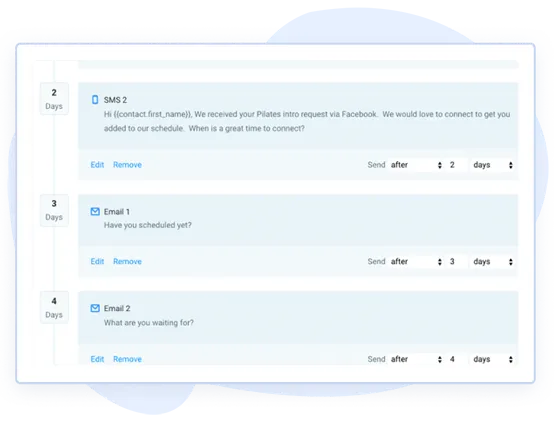
Smart email triggers are what propel people from browser to devotee. These strategies depend upon timing, relevance, and personal touch. For SMBs, automation and easy tools like NationwideLeads save time and provide a professional, consistent brand experience.
Below are key moments in the customer journey where email triggers work best:
New sign-ups or subscribers
Cart abandonment
Completed purchases
Periods of inactivity
Special milestones (anniversaries, purchase thresholds)
Browsing or behavior-based triggers
Cold email campaign opens or clicks
Tailoring each trigger to your marketing objectives keeps the communication concise and on point. For example, your cold email campaign get clicks and instead of calling them, you follow-up with a ringless voicemail from your CRM personalized with your own voice. Monitor campaign data frequently to find out what works and what needs adjusting so you continue to improve your results.
1. The welcome
A great welcome email series is more than just a quick hi! It provides new subscribers valuable links, getting started tips, and expectations for what’s to come. Using their name and information about their sign-up demonstrates that you care about their experience.
Personal touches, like “Welcome, Maria—here’s how to get the most from us,” can increase early engagement. Employ automated workflows so each new contact receives a well-timed, uniform introduction, even if you’re a one-person operation.
2. The abandoned cart
Automated reminders within an hour or so of abandonment are likely to save tons of lost sales. For optimum effect, follow up again within 24 hours. Use subject lines that call out the product or the customer’s name like ‘You left [Product] in your cart.’
Limited-time discounts or free shipping add urgency and can tip the scale. Follow what they abandon and test; sometimes all that’s needed is a little push, other times it’s a nice discount.
Identifying trends, such as your most abandoned products or the time of day people shop, allows you to optimize your strategy. Segment these people and change your emails to see what gets the best response!
3. The post-purchase
Thank-you emails immediately after a sale express gratitude and foster confidence. Then, send a follow-up a few days later with tips or resources for utilizing the product. Solicit reviews or invite them to provide comments.
These emails increase satisfaction and can be used to cross-sell related products or services, turning one-time purchasers into frequent customers.
4. The re-engagement
Identifying inactive subscribers who haven’t opened your emails in 30 to 60 days allows you to reach out to them with re-engagement campaigns. Provide a discount or some sort of exclusive content to excite the user.
Make these emails personal based on previous purchases or interactions for an added touch of relevance. Look at open rates and clicks to find which tactics return people, then respond and tweak your emails accordingly.
5. The milestone
Commemorate customer milestones with a personal spin, such as 1-year anniversaries or hitting a spending limit. These emails demonstrate that you appreciate their loyalty and foster long-term relationships.
Include a tiny prize or special deal to maintain the momentum. Track responses to optimize future milestone campaigns.
Designing your email campaign process flow
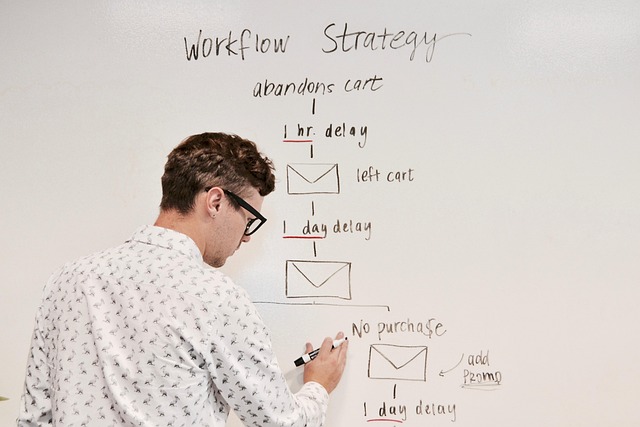
Robust email campaign process flow means every stage matches the customer’s requirements and assists your business expand. This flow ensures that every email pulls its weight, whether it’s greeting new leads, persuading fence sitters, or maintaining customer loyalty.
With so many solopreneurs and microbusinesses depending on email to generate business, it’s imperative that we nail the process from the beginning. Below are the main stages to build a solid flow:
Planning the Customer Journey: Break down your customer’s path into stages: first contact, engagement, purchase, retention, and re-engagement. Every stage has different requirements. For instance, a welcome flow welcomes subscribers to your brand and establishes trust, while a post-purchase flow thanks buyers and drives repeat purchases.
Defining Email Goals: Every email must have a clear goal—educate, convert, or re-engage. For example, an abandoned cart email is designed to drive a purchase, whereas a feedback request solicits customer feedback.
Choosing Triggers: Triggers could be signing up, viewing a product, or purchasing. Utilize behavioral data such as purchase history for customized messages.
Designing the Workflow: Visual aids such as a drag-and-drop builder help your team map out each email’s triggers, conditions, and actions quickly. A flowchart makes it easier to identify gaps or redundancy.
Personalization: Tailor every email using customer data. Personalization increases relevance, opens, and conversions.
Timing and Frequency: Send emails when they matter most—right after sign-up, shortly after a cart is abandoned, or post-purchase. Spread messages out—don’t swamp recipients.
Automation: Automation saves time and needs solid rules and regular tweaks to stay effective. It’s not ‘set and forget.’
Continuous Review: Check results often and update flows to match changing needs.
Mapping the journey
Mapping the journey is about enumerating every customer touchpoint and connecting it to the appropriate email. Let’s begin with that initial contact — perhaps it’s a sign-up or download.
Then, note each point where customers interact: browsing, buying, leaving feedback, or even unsubscribing. Identify points of attrition. Target those with emails like a nudge or an offer.
Customer feedback helps you identify gaps or confusing transitions. A frictionless path keeps them going, not stalled or wandering. Periodic review keeps your map accurate as your business or audience evolves.
Setting the rules
Trigger definition is key. Did the customer view a product, click on your email campaign, abandon a cart, or purchase? Define strict rules for the timing of each automated message.
Timing is important; for example, don’t blast out two emails in the same hour. Comply with laws such as the Telephone Consumer Protection Act to keep the lawyers at bay.
Review your campaign policies frequently and let open rates and feedback guide you in tuning. Rules ought to evolve as your audience or goals do.
Testing the sequence
A/B testing is your best weapon in discovering what works. Experiment with subject lines, content, and send times.
See which emails get opened or clicked. Take the results and use them to tweak your emails and workflow. Try to experiment frequently and keep notes of what you learn.
Gradually, this accumulates a tested playbook for your brand.
Trigger your CRM ringless voicemail drops
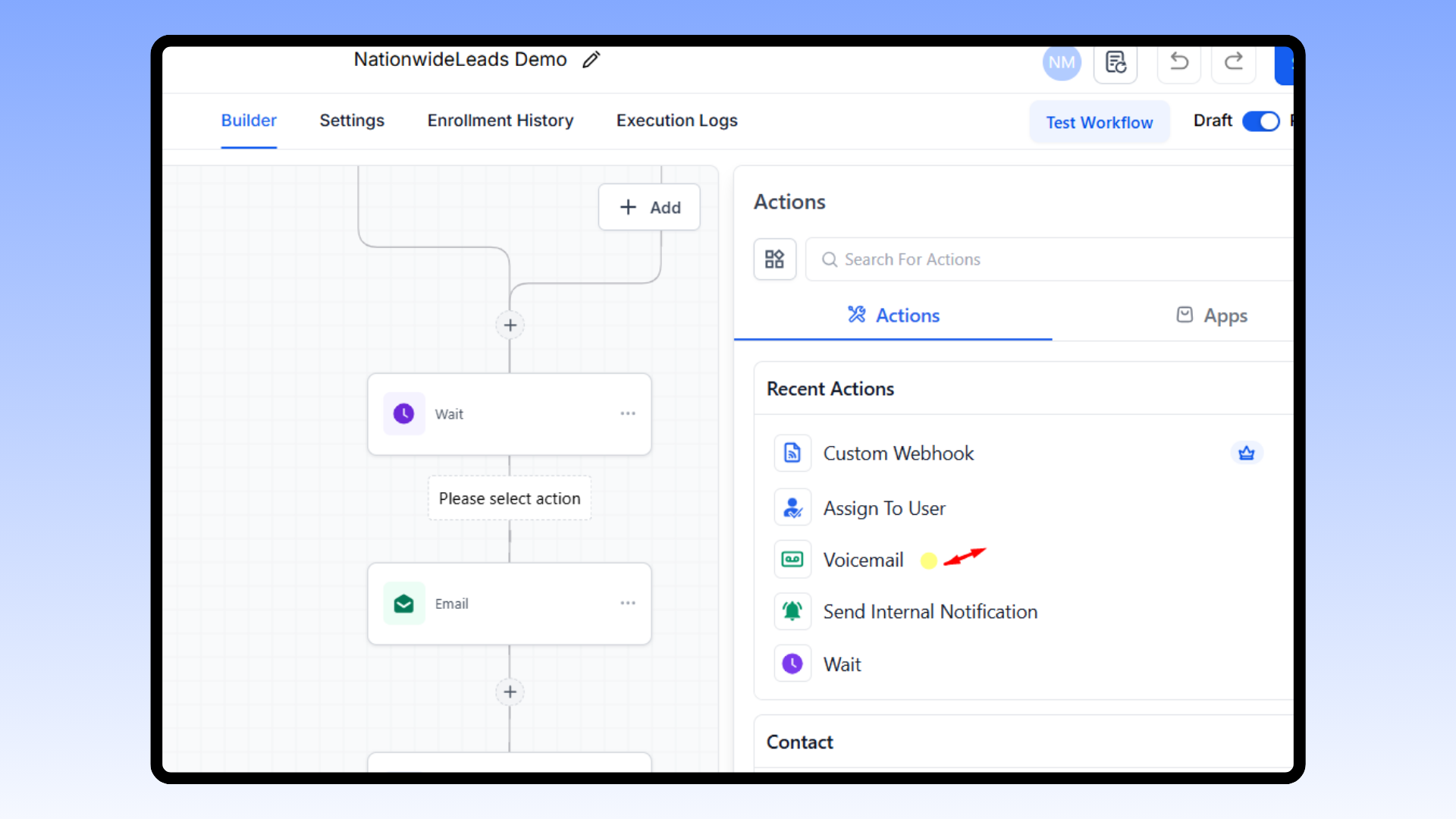
Incorporating CRM ringless voicemail drops into your email marketing strategy can be a handy small business way to enhance outreach without being pushy. This ringless voicemail technology allows teams to send voice messages straight to a customer’s inbox, bypassing live calls, which many find disruptive. By integrating these drops into your trigger email campaigns, you can improve customer engagement without overwhelming your audience.
Most modern CRMs support this technology as add-ons but platforms like NationwideLeads provide it as a native module, making it easier to integrate voicemail drops neatly into your workflows. With your triggers you can control who receives messages and track every touchpoint, ensuring security and accountability in your email marketing program.
This integration is not just about scale; it’s about timing and personalization. Real-time triggers allow you to automate voicemail drops for specific live CRM events, such as when a lead opens an email a certain number of times or a meeting is booked. Voicemail campaign results delivered, heard, replied to, or callback received flow right back into your CRM, showing what works and what needs a rethink.
Compliance, of course, including TCPA in the U.S., remains a central mandate all along but CRM platforms like NationwideLeads help you navigate that checking and reviewing your messages for compliance automatically
The human touch
Personal touch in voicemail makes a difference, especially for small businesses that rely on trust. When you write messages, use casual language that sounds like you are talking to a buddy, not a telemarketer. Put aside business-speak!
This laid-back approach puts recipients at ease and makes them more likely to listen through. Sprinkle in short anecdotes or customer quotes in your message to demonstrate you’re a human and get what they’re going through.
For instance, reference a comparable company that experienced outcomes once they signed up for your offering. Encourage them to respond, inquire, or ring you back. Directives such as "Tell us if you need more info" nudge people to respond, making a passive message active.
Strategic timing
Ringless voicemail drops come in most effective when paired with your email sends. Use CRM data, like when a contact typically opens emails, to drop voicemails during those windows. If your analytics indicate more engagement midweek, focus your drops there.
Try different timings. Some audiences convert best in the morning, some in late afternoon. Test sending voicemails immediately following a critical action, like a form fill out or email open, to reinforce your message.
Be sure to monitor response patterns and adjust your schedule as you discover what works.
Follow-up automation
Automated is best for consistency. With CRM automation templates and AI, you can set up flows that send follow-up voicemails after key triggers, like a demo request or a sales call. The CRM records responses, so you can customize next steps, perhaps a reminder or thank you based on their most recent behavior.
Cue automatic reminders for your team to follow up with a call or message if a lead hasn’t responded. This prevents engagement from falling through the cracks. Track these auto sequences and see if they generate more replies or callbacks.
Data proves that callback rates can increase by as much as 30 percent when strategically utilizing voicemails.
How to measure success
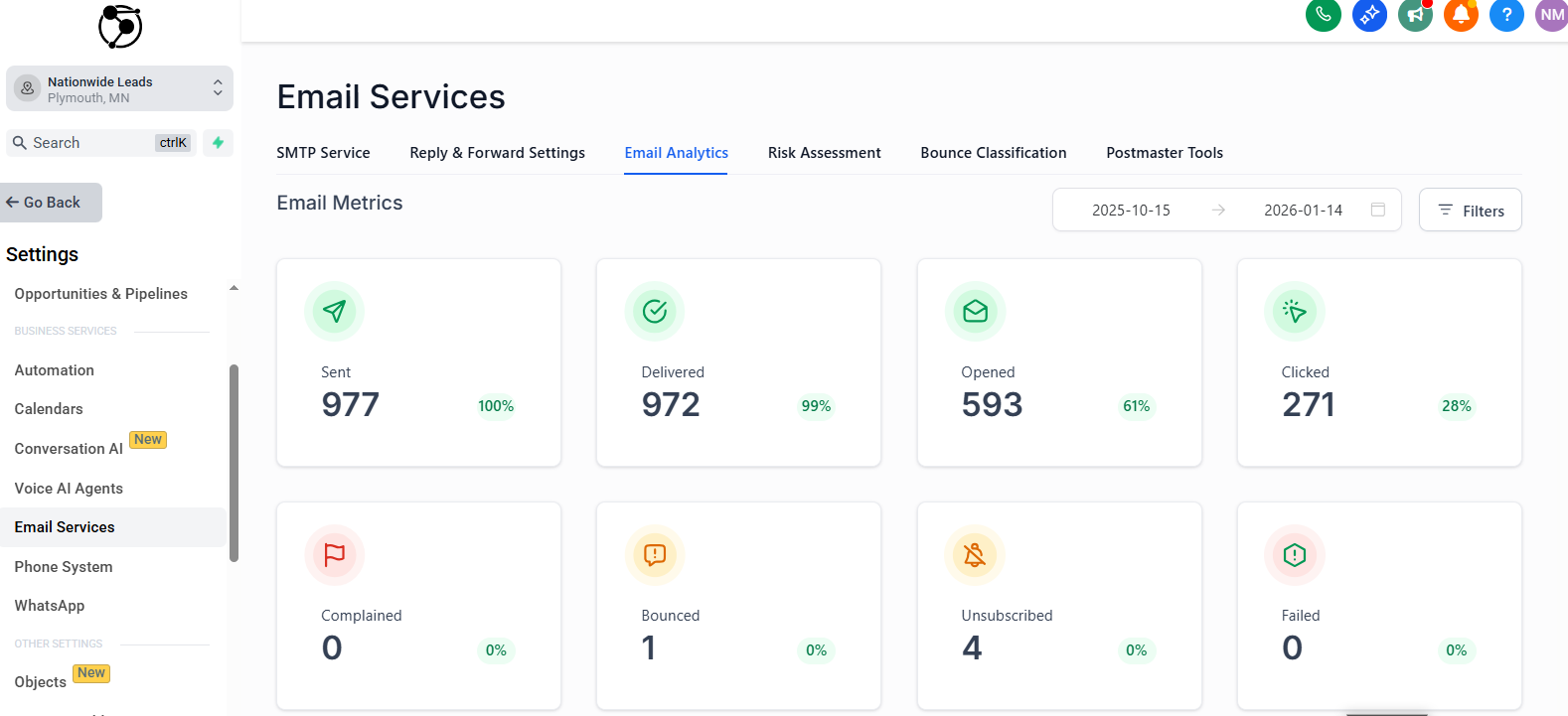
Measuring the impact of email campaign trigger strategies is more than looking at open rates. First, establish concrete objectives for every campaign. Take a checklist approach and jot down what you hope to accomplish, whether it is increasing conversions, traffic, or subscribers.
Match these goals to an SLA if you have sales and marketing. This way, we are all clear on how to gauge success. With targets defined, leverage analytics to monitor open, click, conversion rates and beyond. For instance, if you want more sales, track conversion rate, which is the number of people who did what you wanted them to do divided by the total emails sent multiplied by 100.
Compare these figures on a weekly or monthly basis to discern trends and level out sudden increases or decreases. Regular reviews help find what works or what needs fixing, so you can improve with each campaign.
Key performance metrics
Open Rate: Percentage of people who opened your email.
Click-Through Rate (CTR): The number of clicks from email to your site, divided by the number of emails delivered, multiplied by 100.
Conversion Rate: Percentage of recipients who completed your goal action, like making a purchase or signing up.
Unsubscribe Rate: The number of people who opted out divided by emails delivered, multiplied by 100.
Spam Complaint Rate: Total spam complaints divided by emails delivered, multiplied by 100.
Email List Growth Rate equals the number of new subscribers minus unsubscribes divided by the total number of subscribers, multiplied by 100.
Forward/Share Rate: The number of forwards or shares divided by the number of emails sent, multiplied by 100.
ROI: (Total revenue – Total investment) / Total investment x 100.
Conversion rate is the ultimate way to determine if your campaign is on target. Even if open rates look good, if people aren’t clicking or buying, your message or offer might need work.
If you notice a sharp increase in unsubscribes or spam complaints, it’s an indication that your content, timing, or targeting is out of whack. Watch these rates like a hawk to avoid long-term list damage.
Engagement metrics such as forwards, shares, and list growth rate indicate whether your emails generate enthusiasm that extends outside your circle of subscribers. If content has a lot of people sharing it, that’s a pretty good sign it is something valuable, worth sharing.
A/B testing insights
A/B testing provides you with honest feedback on what your readers enjoy. Conduct trials with distinct subject lines, layouts, or calls to action to determine which elicits greater engagement. For example, try a short subject line compared to a long subject line, or a simple button compared to a text link.
Look at the test results for each campaign. If one subject line achieves a 25% open rate and another only 15%, use the winner for the next go-round. Record these discoveries in a shared doc or your CRM so you can replicate what works best.
Keep all your winning strategies written down. Over time, this constructs a library of tried and true strategies tailored to your audience and objectives.
Personalization beyond the first name
Personalization in email used to just be calling a customer by their first name. Today, smart personalization goes well beyond first names and entails using a mix of behavioral data, purchase history, and contextual cues to deliver the right message at the right time. Small businesses can earn trust and increase interest by demonstrating they ‘get’ their audience.
When it’s done well, personalization means more opens, more clicks, and more conversions.
Behavioral data
Email marketers build profiles based on behavioral data, such as how people use their site, click emails, or even browse products. This encompasses what links they follow, which pages they visit, and for how long. By observing these behaviors, trigger email campaigns can be timed for when the user is most likely to interact. Having the right strategy makes all the difference
Dynamic content powered by behavioral data allows you to show different products, images, or offers to every user based on their habits. For example, if a user browsed a certain category but didn’t purchase, you can highlight those exact products in your email marketing strategy.
Over time, as you track and update your data, you become better at anticipating what customers desire, which creates loyalty. Examining your behavioral and psychographic data allows you to comprehend what your audience does and why they do it. This makes your emails personal and less blast-like, enhancing customer satisfaction and retention.
Purchase history
Purchase history allows you to personalize an email to what someone has actually bought in the past. If they’re buying printer ink, a heads up before it runs out is useful. Cross-selling is effective as well; suggest an accessory or upgrade to complement something they already have.
Segmenting by purchase history means you’re not shooting the same email out to every customer. Instead, premium customers might receive VIP offers, while new customers get onboarding advice. Measure their performance because purchase-based triggers tend to be your highest converters.
Contextual cues
Contextual cues assist you in writing good emails that align with each customer’s current reality. By pulling in location data, you can send local offers or highlight in-store events, enhancing your email marketing strategy. Trigger-based emails, such as birthday emails or special offers during the holidays, demonstrate that you’re planning for your customer.
Earlier messages provide additional hints; for instance, if a customer clicked on a webinar invite, you should send them a recording or related content. Watch trends and tailor your trigger email campaigns to address specific interests in particular regions.
Context has to be refreshed frequently. Just using old data makes your emails start to feel stale. Update your triggers frequently so the content is relevant and timely.
Conclusion
Smart triggers mean your emails hit at the right moment. No one likes boring blasts. Good triggers capture people, keep them connected, and build trust. Adding ringless voicemails to your CRM workflows puts your name in their ear. You want to arrive with something that’s truly helpful, not just more noise. Keep an eye on your figures. Open rates, clicks, and replies each tell a story. Let it be simple but acute. Know your list. Use what you learn to tweak your flow. Even little shops can run brash, pro-level campaigns that pack a big punch. If you are interested in seeing how this could work for your business, try for free or book a free consult to walk you through the steps and share some ideas that match what you require.
Frequently Asked Questions
What are triggered emails in an email campaign?
Triggered emails are automatic messages sent based on customer actions or other events. These emails play a crucial role in an effective email marketing strategy by providing timely, pertinent information that boosts user interaction and sales.
Why are trigger strategies important for email campaigns?
Trigger email campaigns get your emails to them when they’re most interested, raising open rates and substantiating your email marketing strategy.
How do I design an effective email campaign process flow?
Begin with customer journey mapping and develop a comprehensive trigger email marketing strategy. Determine important customer actions, establish triggers, and automate customized replies to enhance your email marketing campaigns.
What is CRM ringless voicemail drop integration?
CRM ringless voicemail drops enable you to drop voicemails directly in a user’s inbox without their phone ringing, enhancing your email marketing strategy and trigger email campaigns.
How can I measure the success of triggered email campaigns?
Monitor important numbers, such as open rates, click-through rates, and conversions in your email marketing campaigns. Leverage analytics to track and perfect your email marketing strategy.
How does personalization go beyond using the first name?
Personalization triggers, such as those based on user preferences and behavior, enhance your email marketing strategy by making your messages more relevant and boosting engagement.
Are triggered emails suitable for a global audience?
Yep, trigger email campaigns can be internationalized. Ensure inclusivity and a comprehensive email marketing strategy.