Automate loan document approval software for efficient workflows
LOS Document Approval Software with CRM automation—Helping Teams Approve Files, Track Changes, Convert Leads to Clients Optimally and Get Sign-Offs Fasters With Less Stress!
Loan officers use it to accelerate work, reduce email chains, and keep track of who did what. Most platforms display updates in real time and integrate seamlessly with CRM and customer engagement tools
To demonstrate how these tools save time and money, this post outlines key features and tips
Key Takeaways
Loan Document Approval Software workflow to optimize approval of loans and leads conversion
Take a hard look at your existing approval processes, where things bog down, what your team thinks, and so on, before implementing automation.
It’s important to select document approval software that offers strong tracking and compliance features and integrates effortlessly with your CRM.
Integrating document approval software with your CRM centralizes information, streamlines communication, and speeds up the overall loan process.
If you want document approval software to work, transparent approval rules and thorough team training are critical for adoption and ongoing process refinements.
Finally, always keep an eye on metrics like approval times and user satisfaction to see how well your automation is working and to help you make it even better.
Table of Contents
How to automate document approvals
Key features of document approval software
The CRM and automation synergy
Benefits of CRM with automation:
Utilize data from document approvals to inform CRM strategies:
Create automated reminders for document submissions and follow-ups:
Foster a cohesive workflow between document approval and CRM systems to optimize efficiency.
Beyond approvals: a relationship engine
Measuring your automation success
What is document approval software?
How does automating loan documents save time?
What are the key features of document approval software?
How does document approval software integrate with CRM systems?
Can document approval software be used for more than just approvals?
Why automate loan documents?

Loan document automation refers to software automation processes that eliminates manual steps when preparing, sharing, and approving loan files. For small businesses, solopreneurs, and microbusinesses, this shift isn’t just about speed. It’s about reducing friction, expense, and lost hours while staying in step with tight regulation.
We believe that fast is what distinguishes small lenders and borrowers. Manual review of PDFs, spreadsheets, and a patchwork of borrower files can eat up hours or even days. Due diligence teams are stuck in a copy-paste routine, verifying the same information over and over again in multiple places. Each additional touchpoint represents risk, risk of errors, overlooked due dates, or even just fatigue.
With LOS document approval software automation with CRM tools, these bottlenecks diminish. Files go straight from intake to review, with a lot less back and forth. Timelines go from days to minutes, freeing up staff for higher-value work and allowing decisions to arrive sooner.
By reducing manual effort, you make the process more precise and less excruciating. Manually copying numbers from one file to another or searching through emails for the appropriate attachment is where most errors sneak in. Analysts can expend hours merely finding, re-keying, and reconciling information before they even begin actual credit analysis.
Automation software identifies missing documents, highlights inconsistent information, and ensures that all forms are filled out at the outset. Lenders receive files that are both more accurate at intake and more useful for day-to-day decisions and long-term portfolio management. That means fewer errors, less redundant work, and less expensive surprises down the road.
Being compliant is a headache for lenders of any size, especially with rules that change often and can be harsh. Each document must display a defined audit trail—who handled it, when, and modifications. Automated approval software has tracked every step, so you can easily retrieve records and demonstrate compliance months or years later.
It’s not just checking boxes. It’s about keeping both the business and its customers safe from risk and fines. Making borrowers happy is simply good business. Automation helps lenders accelerate approvals, reduce paperwork, and provide transparent status updates throughout the process.
Customers don’t want to wait weeks for a decision or resend the same documents repeatedly. Quicker loan approvals lead to happy clients, more referrals, and a stronger reputation in a competitive market. Lenders witness higher approval rates, lower costs to acquire customers, and shorter average sales cycles, too.
How to automate document approvals

Automate document approvals to save small business owners and teams time, reduce errors, and streamline workflows. With the right configuration, approvals can evolve from tedious manual affairs into sleek digital pipelines that scale to any enterprise.
Enable teams to follow documents, accelerate approvals, and concentrate on larger work, not paper pursuits.
1. Assess your workflow
First, diagram your existing approval process. Track each stage, from a document’s inception to its final approval. This allows you to identify bottlenecks.
If loans languish for days in someone’s inbox, for instance, that is an obvious sign of friction. Seek out tasks staff complete manually that could be automated. Typical examples are shifting documents between directories or dispatching reminder messages.
Talk with teammates and find out where they’re stuck or wasting the most time. Frequently, they’ll reference waiting on approvals or losing track of document status. Collect their input; those on the front lines know where the genuine sore spots are.
Begin by automating one high-friction workflow, such as invoice approval, before implementing changes across the entire company.
2. Select the right software
Picking the perfect loan origination software with document approval software requires homework. Seek an easy-to-use tool with version control and compliance tracking.
Features like drag-and-drop, dashboard views, and clear audit trails go a long way. It should align with your daily document requirements, be it contracts, invoices, or purchase orders.
See if it plays nice with your existing systems. Integration is the key. Steer clear of tools that seem clunky or force you to double-enter data.
More powerful approval management platforms allow you to add rules, automate steps, and process a wider variety of document types. Try the software with a single department or team prior to a full roll-out to see if it really fits your workflow.
3. Integrate with your CRM
Syncing your document approval tool with your CRM can save hours. Connect the two so updates appear in real time and information flows in both directions.
For instance, employees can simply add loans into the LOS and the solution can import, index, and prepare them for approval and follow-up — no additional steps required. Leverage CRM capabilities to follow-up and notify you if something is pending.
Integration keeps your sales, finance, and loan processes in sync. Because the links are live, any errors or bottlenecks are flagged immediately, so nothing slips through the cracks.
4. Configure approval rules
To keep approvals fast and transparent, establish granular rules in your software. Specify who approves what, in which sequence and under which circumstances.
For small teams, it could mean routing all loans over a certain amount to a manager or sending contracts to legal for review prior to sign-off. Automate alerts so everyone knows when something requires their attention.
Approvers can reply from their email, a dedicated approvals hub, or a mobile app. Review these rules frequently. As your business grows or as feedback arrives, adjust the configuration to maintain smooth operation.
5. Train your team
One deep-dive training can make or break adoption. Train staff how to use the new system, where to find documents, and how to click to approve or reject.
Provide resources nearby and support as they adapt. Get teammates to contribute tips and best practices. Others will discover hacks or methods to optimize the software for their workflow.
Watch how the team uses the system and intervene with additional support or training if necessary.
Key features of document approval software CRM integration
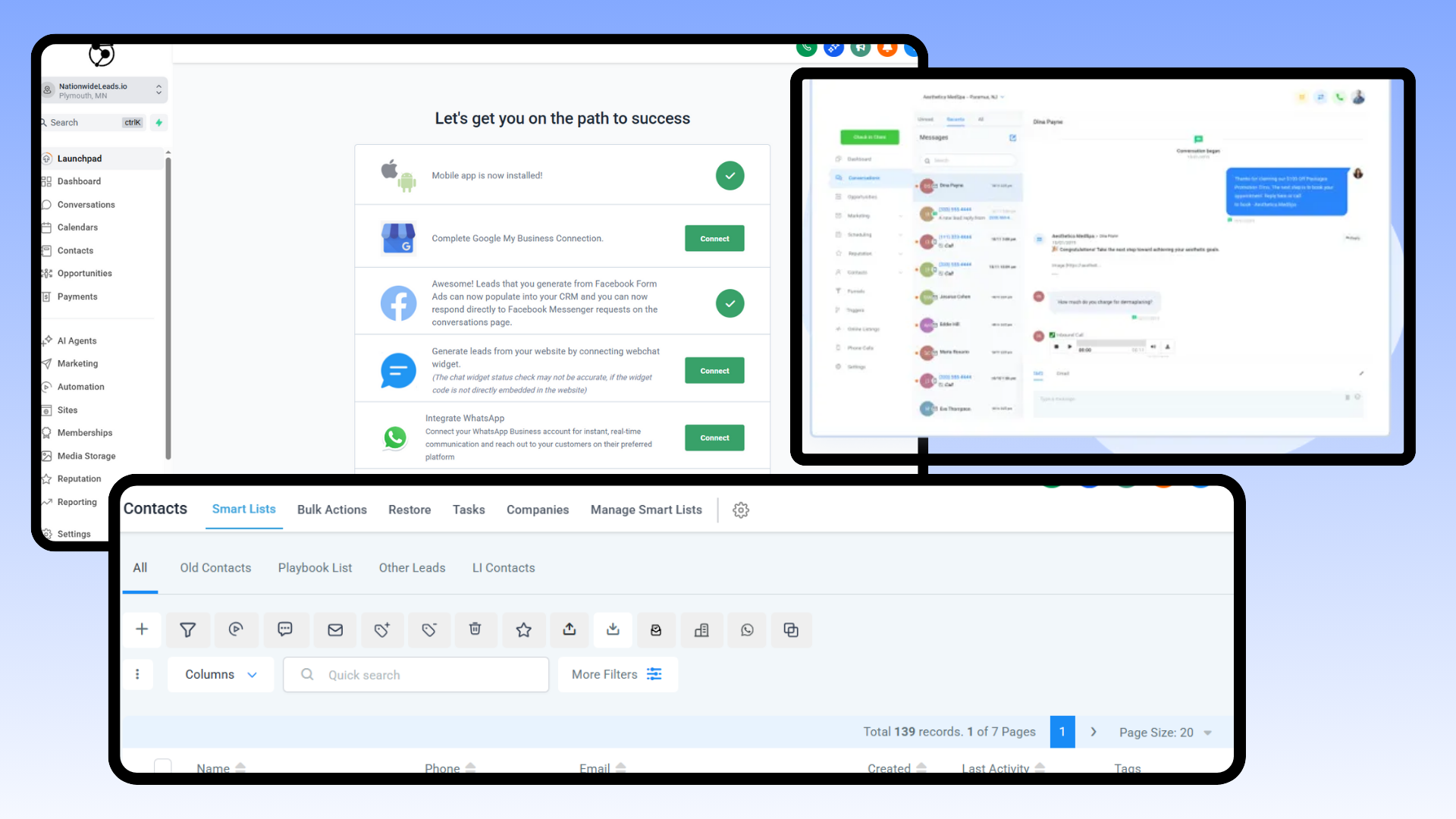
Document approval software assists teams in accelerating the review and sign-off process for documents, agreements, or proposals. For small business owners and microbusinesses, the right tool can translate into fewer delays, improved collaboration, and transparent records for compliance. Selecting the best-fit software is about understanding which features are most important for your workflow, team size, and tasks at hand.
Key features to consider include:
Automated workflows for fast routing and fewer manual steps
Real-time co-authoring for team collaboration without bottlenecks
Audit trails for compliance and accountability
Seamless integration with CRM, cloud drives, and project tools
Conditional routing establishes rules based on the document type or value
AI-powered review for error and compliance checks
Standardized and repeatable approval steps for consistency
Performance tracking with dashboards and analytics
Simple, clean interface for fast team adoption
Robust document tracking is paramount. It should track each step, including who edited what, who approved and when. This audit trail is crucial for regulatory compliance, internal policy verification, and legal evidence. For businesses operating in regulated spaces, a transparent trail can prevent wasted time and headaches when an audit or dispute arises.
An easy-to-use interface brings your team on board quickly. If the interface is slick, with drag-and-drop uploads or intuitive menus, users spend less time training and more time doing. Seek platforms that provide integrated tutorials or tooltips and obvious buttons. They can be challenging to launch, so it is smart to pilot with a small group first to observe their rate of adoption.
Integration is a necessity. The top tools integrate with your CRM, cloud storage such as Google Drive or Dropbox, and project management software. This allows you to import contacts, pre-populate fields, or initiate approval processes directly from your primary workflow. For instance, a loans contacts notification email and follow-ups with the right links from your CRM helps complete the LOS approval with no downloads or lost emails necessary.
Automated workflows and conditional routing save actual time. You can configure rules, such as forwarding all invoices above a certain value to a manager or routing contracts with incomplete information back to the sender. That eliminates overlooked steps and waiting and reduces follow-up.
AI-driven review tools are now standard. They flag absent clauses, catch compliance gaps, or recommend edits for clarity. For small teams, it translates to fewer errors and quicker first-time approval. Analytics dashboards follow cycle times, error rates, or how frequently docs require rework, so you can identify and resolve bottlenecks.
The CRM and automation synergy

A CRM combined with automation packs a punch for small businesses having to deal with documents and approvals. These systems can be so much more than customer info warehouses. They accelerate and streamline how teams work, reduce errors, and provide a centralized location for all business data.
Together, the CRM and automation synergy makes it easier for owners to operate the business wherever they or their teams may be.
Benefits of CRM with automation:
When CRM has automation, the benefits are obvious. First, the business can maintain all customer records in a single place, making it simple to look up history and know what’s working. The team can configure workflows for new contract approvals or onboarding documents.
This saves time and avoids missing key steps. Business owners can use these tools to put rules on who can see what, so sensitive info stays protected. Access controls and permissions ensure that only the appropriate personnel can access or modify documents.
With a web-based CRM like NationwideLeads, everyone can work from anywhere and all updates appear in real time. For instance, a business with offices in different locations can have employees upload, review, and approve files directly from their laptops, with no email ping-pong necessary.
Utilize data from document approvals to inform CRM strategies:
With every document approved, the system learns more data about how the business operates. CRM tools can measure how long approvals take, who gets things done fast and where things bottleneck. Owners can leverage these insights to identify bottlenecks or incentivize high performers.
For instance, if sales contracts always seem to get bogged down with a particular department, the CRM will reveal this. The owner could then tweak the workflow or introduce training. These data points further assist in forming stronger customer bonds.
If the approval process is quick and frictionless, customers receive what they need when they need it, which creates loyalty.
Create automated reminders for document submissions and follow-ups:
In most systems, automated reminders are a snap to configure. When a document is due, the CRM can fire off email or SMS alerts to the right people. This reduces late submissions and maintains rapid deal flow.
Owners can add reminders for follow-ups, so nothing falls through the cracks. For example, if a client has to sign a form, the CRM can remind them every couple of days until it’s completed.
Foster a cohesive workflow between document approval and CRM systems to optimize efficiency.
Connected systems lead to less manual tasks. A visual workflow editor allows owners to create customized routes for every document type. For instance, a leave request requires just a manager’s sign-off, and a new vendor contract routes to legal and finance for review.
With business process automation, every step occurs in the proper sequence, with notifications for delays or information gaps. This made the work not only faster but provided a superior user experience. Your team can work, status-check, and troubleshoot from anywhere, on any device.
Beyond approvals: a relationship engine

Document approval workflow software now does more than wrangle sign-offs. The modern platforms are relationship engines that leverage real-time data to build a richer, more responsive experience for teams and clients alike. For small businesses and microbusinesses, this shift counts. It enables teams to move quickly, share updates, and get clients involved, building loyalty and trust.
With a relationship engine, you can track how borrowers engage with documents — who opens them, how long they read and where they query. This kind of insight helps lenders and business owners learn borrower behavior and preferences. For instance, if a client spends an inordinate amount of time on a page, you can contact and explain, making the client feel valued and listened to.
Because your communication is personalized based on these interactions, your follow-ups are timely and tailored, not generic. This matters for small teams who want to get noticed and develop genuine relationships, not just process paperwork in their document approval process.
A main advantage is the way these engines simplify workflows. Teams collaborate in a single secure space, so everyone — internal staff, external partners, or clients — accesses the same information. No more multi-page email chains or lost comments. All comments, requests, and approvals sit in one dashboard, making it easy to keep tabs on where things stand in the document approval workflow.
This time saves and reduces confusion, which is a big deal for multitasking small business owners. It means borrowers receive updates quickly, and that no details slip through the cracks. Transparency builds trust, and clients come back when they’re in the loop.
Data analytics play a significant role. By monitoring how borrowers engage with documents and signoffs, you can identify patterns, pinpoint bottlenecks, and optimize your lending processes. Perhaps you observe clients gravitate towards digital forms as opposed to printed PDFs or that approvals advance more quickly when you’ve implemented automated reminders using document approval systems.
Based on this data, you can optimize each stage, from application to approval, streamlining the entire experience for all parties. A real relationship engine needs to be open. Find things like tailored online forms, no-code AI automations, and effortless integration with your existing tools.
For example, syncing with your CRM or accounting app can reduce manual effort and ensure you capture time and expenses seamlessly. Don’t overthink it. Steer clear of approval chains that drag decision-making. Think about what truly saves time, keeps everyone in compliance, and keeps everyone in and out of the loop.
Measuring your automation success
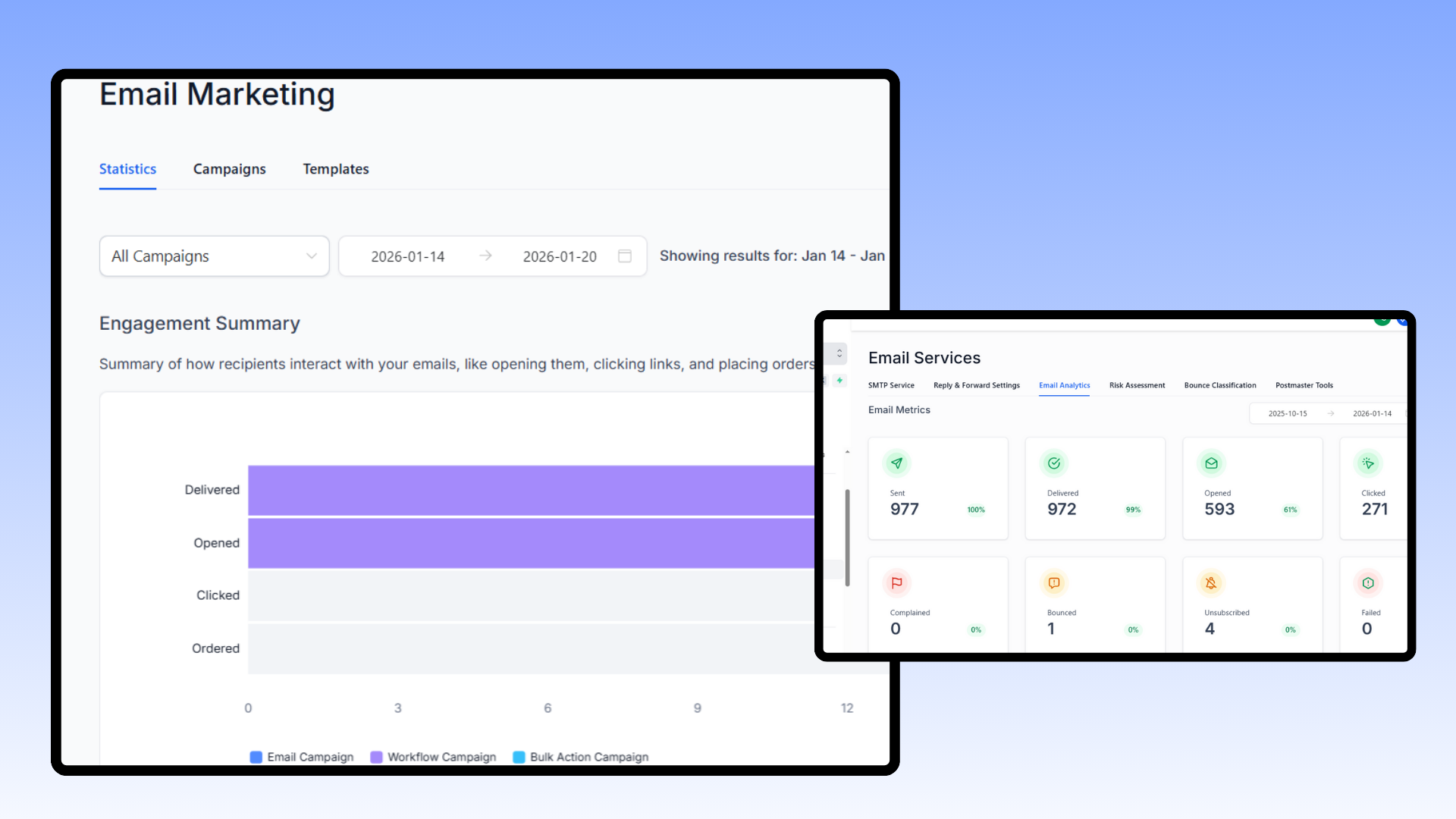
Keeping track of the correct metrics serves as the foundation of whether or not your document approval workflow software is working in your favor. Lots of SMBs, side hustles, and solopreneurs want to understand if their automation investment is paying off—not just in saved hours, but in actual business results.
The table below lists key metrics used by organizations worldwide to measure automation success in document approval workflows:
If you implement LOS or document approval software, measuring approval time is a good place to start. This measures whether your documents are flowing more swiftly through the process. For example, if it previously took two days per approval and now it’s half a day, that’s obvious headway.
The error rate is important too. Fewer errors require less rework, which is strongly connected to the first-pass approval rate. High first-pass approval rates indicate your team turns in documents correctly the initial time, which saves time and simplifies the document approval process.
More than 25% of businesses—nearly 31%—have already automated a business function. It demonstrates that automation is no longer a trend, but a thing fundamentally defining work in organizations. Automation should simplify reviews and delegate work to the appropriate individuals, so no one is holding up another person’s green light or digging through inboxes for missing documents.
Cutting labor costs, errors, and compliance issues count. If your team is spending less time with manual checks and preventing expensive mistakes, that’s a win.

Regular reviews of your automatic process are crucial. Establish a schedule, perhaps every three months, to review those metrics and identify where processing still bogs down or mistakes still occur.
Begin by examining workflows that generate the biggest bottlenecks or headaches. Pilot test your software with one team first so you can work out the kinks before a full rollout. Seek input from team members and approvers. Their input helps you identify minor issues before they become major.
Training is crucial as well. Ensure that everyone is familiar with the new system, address small implementation problems, and leverage automation to assist their daily work.
Conclusion
For smooth loan deals, a quality document approval software assists immensely. It eliminates delays, reduces errors, and keeps employees aligned. Your perfect CRM blend means speedier actions, convenient reviews, and transparent comments for each client. People experience less anxiety and more confidence in the flow. Real-time alerts, clean dashboards, and quick feedback form a dynamic structure. Small shops, side hustles, and growing teams get the most out of simple, smart tools. Even if tech smells like new, a good configuration makes things simple, not complicated. To find out how the right mix complements your business, watch in action, start a free trial or contact us for a conversation. Get the jump and deals flowing.
Frequently Asked Questions
What is document approval software?
Document approval software automates the review and approval workflow for digital documents, enhancing document workflows. It assists teams in collaborating effectively, monitoring their progress, and ensuring everything is in order, minimizing mistakes and conserving time.
How does automating loan documents save time?
Automating loan documents using document approval workflow software cuts down on tedious work and manual entry, accelerating approvals and resulting in quicker turnaround and fewer bottlenecks for employees and customers.
What are the key features of document approval software?
Top features of approval workflow software include workflow automation, version control, real-time notifications, secure digital signatures, and audit trails, which streamline the document approval process and ensure regulatory compliance.
How does document approval software integrate with CRM systems?
Document approval workflow software can integrate with CRMs to sync customer data, monitor document status, and initiate approval workflows. This results in a fluid experience and reduces manual mistakes.
Can document approval software be used for more than just approvals?
Sure, quite a few of them have collaboration tools, document storage, and relationship management, enhancing the document approval workflow and supporting wider business processes, making them valuable beyond just approval.
How can I measure the success of my automation?
Monitor metrics such as approval time, error rates, user satisfaction, and compliance rates to evaluate how the document approval workflow software enhances efficiency and reduces risks.
Is document approval software secure?
Most good document approval workflow software solutions have encryption, access controls, and audit logs to protect sensitive information while ensuring international data security compliance.